Перейти к содержимому
For pet shops & pet stores

Your pet shop, in the pocket of every pet owner nearby

Petifly isn’t an advert. It connects your shop to the owners around you and the wider pet community: they search your shelves, see what’s in stock, use your offers and buy in the app. And it gives you one dashboard for your products, stock, orders, customers and money.

  • Your shelves searchable in the app
  • Live stock on every product
  • Discount codes and gift cards built in
  • Payouts straight to your bank
search box across every shop on Petifly
1
steps from placed to delivered, on their phone
5
weeks between repeat-order reminders
2–8
languages, everywhere
3

Not an advert, a connection

An advert shows your name. Petifly puts your shelves in their hands.

A listing is a name in a long list. On Petifly your shop is part of the app owners already open every day (for their pet’s health book, reminders, walks and the community), so when the food runs low or the new puppy needs a harness, your products are the ones they find, a few streets away, with the stock and the price right there.

What an advert gives you

  • A name and a phone number in a long list
  • Paying to be seen, and hoping someone walks in
  • Customers who can’t see what you stock until they’re at the counter
  • No way to reach them again once they leave

Your pet shop

Connected on Petifly

  • Pet owners near youThey find you under Shops in Explore and on the map, with your hours, directions and a call button.
  • Their pets, by speciesOwners shop for the pet they’ve picked in the app, so dog people see what’s for dogs and cat people what’s for cats.
  • Vets, groomers and other pet businessesClinics, salons, walkers and sitters on the same platform, looking after the same owners.
  • The pet communityOwners who share walks, lost-and-found and advice, and share the places they trust.
  • Ratings from your customersYour score on your page; every review lands in your dashboard to read and answer.
  • Animal SOS alertsHear when an animal nearby is injured or in trouble, and help when you can.

In the owner’s app

Your whole shop, searchable from their pocket

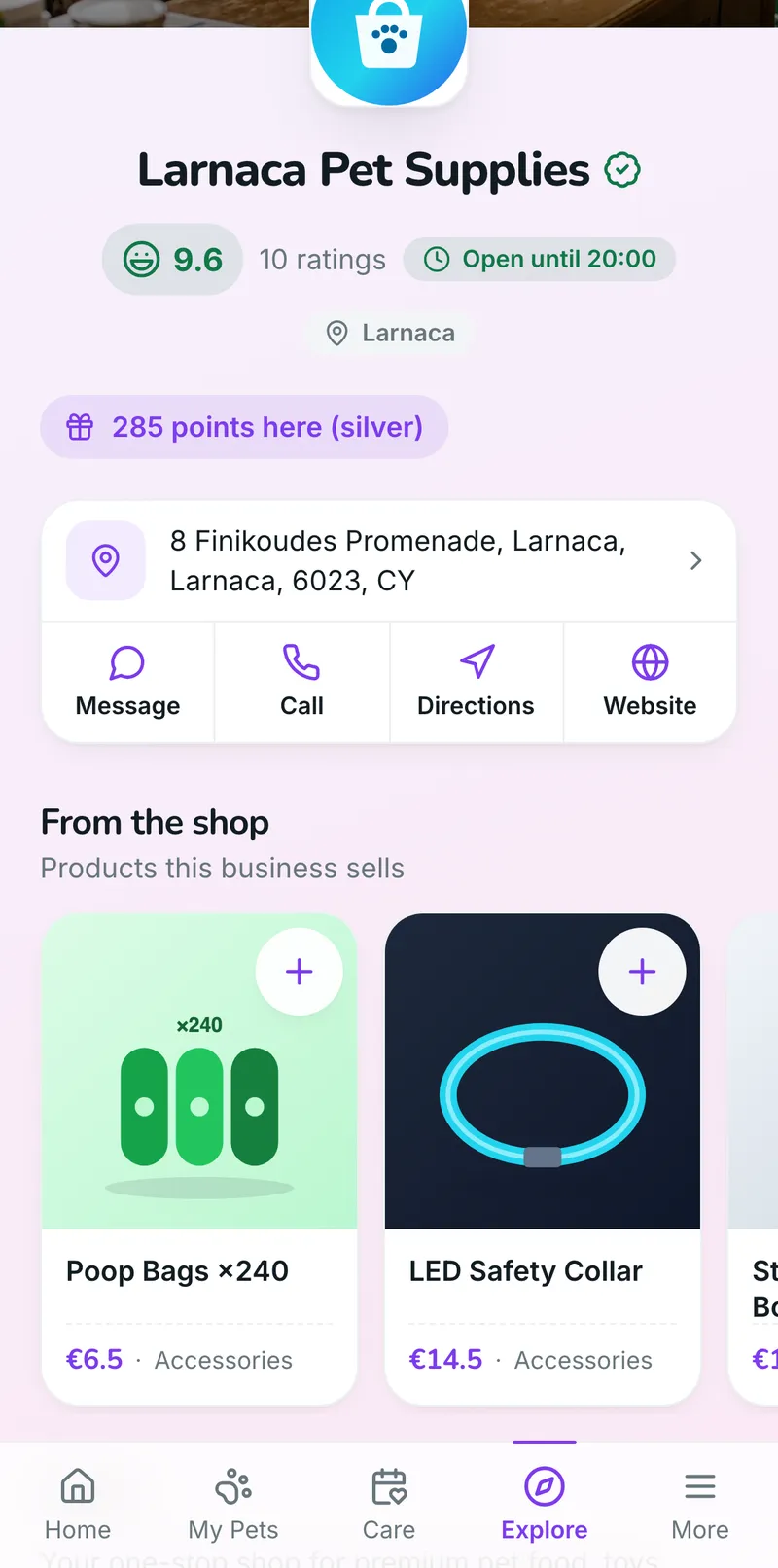
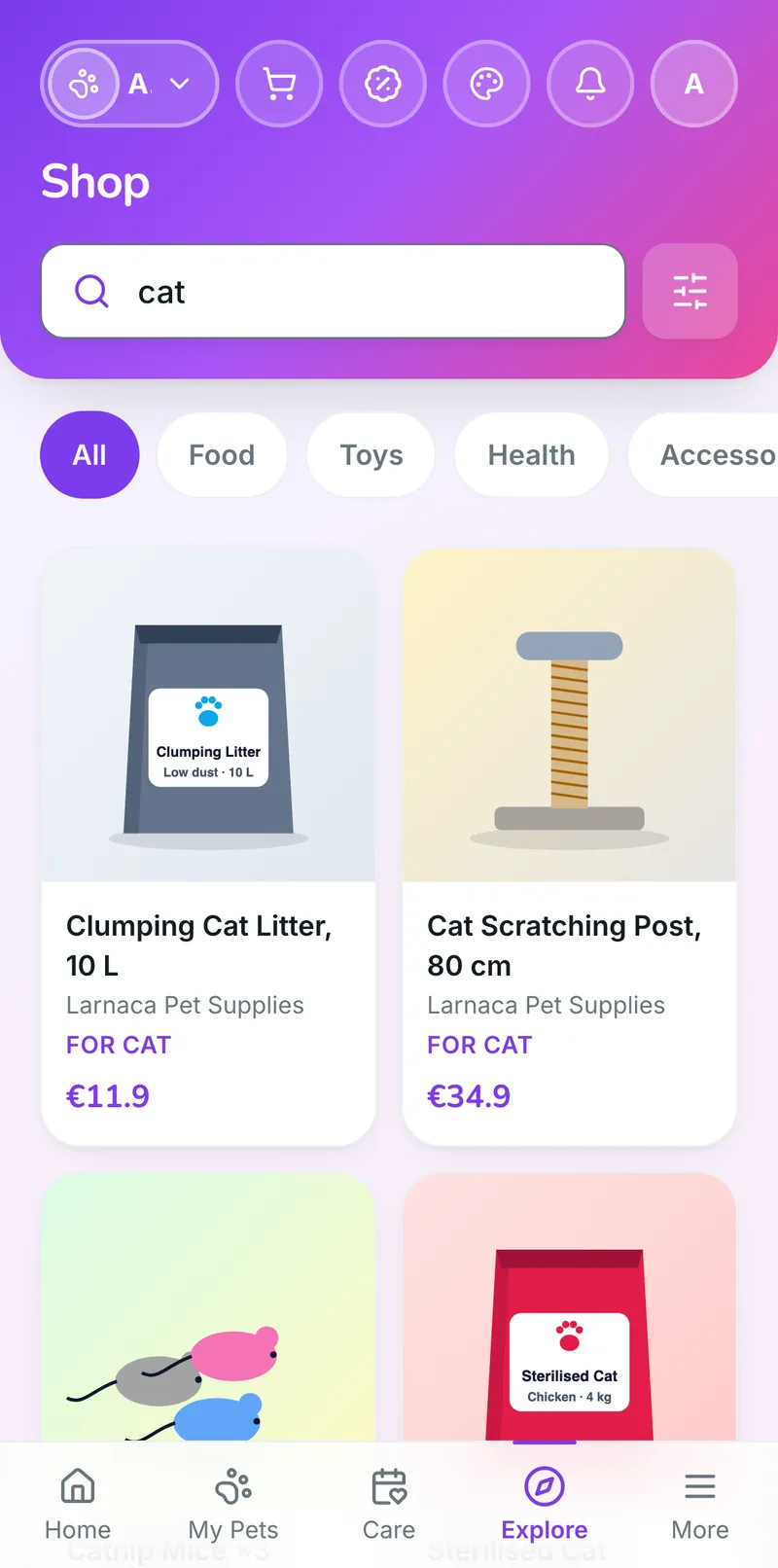
Owners don’t download anything new for you. In the Petifly app they already use, they search the products of every shop on Petifly at once, see what’s in stock and what it costs, use your codes, buy, and follow the order to their door. Every one of those lands in your dashboard.

How stock works

Stock is live. Each product shows how many are available, is marked sold out when it reaches zero, and goes back on the shelf when an order is cancelled, so owners never order something you don’t have, and you never have to phone them to say so.

From search to their door, in the app

  1. 1Search every shop’s shelves at once

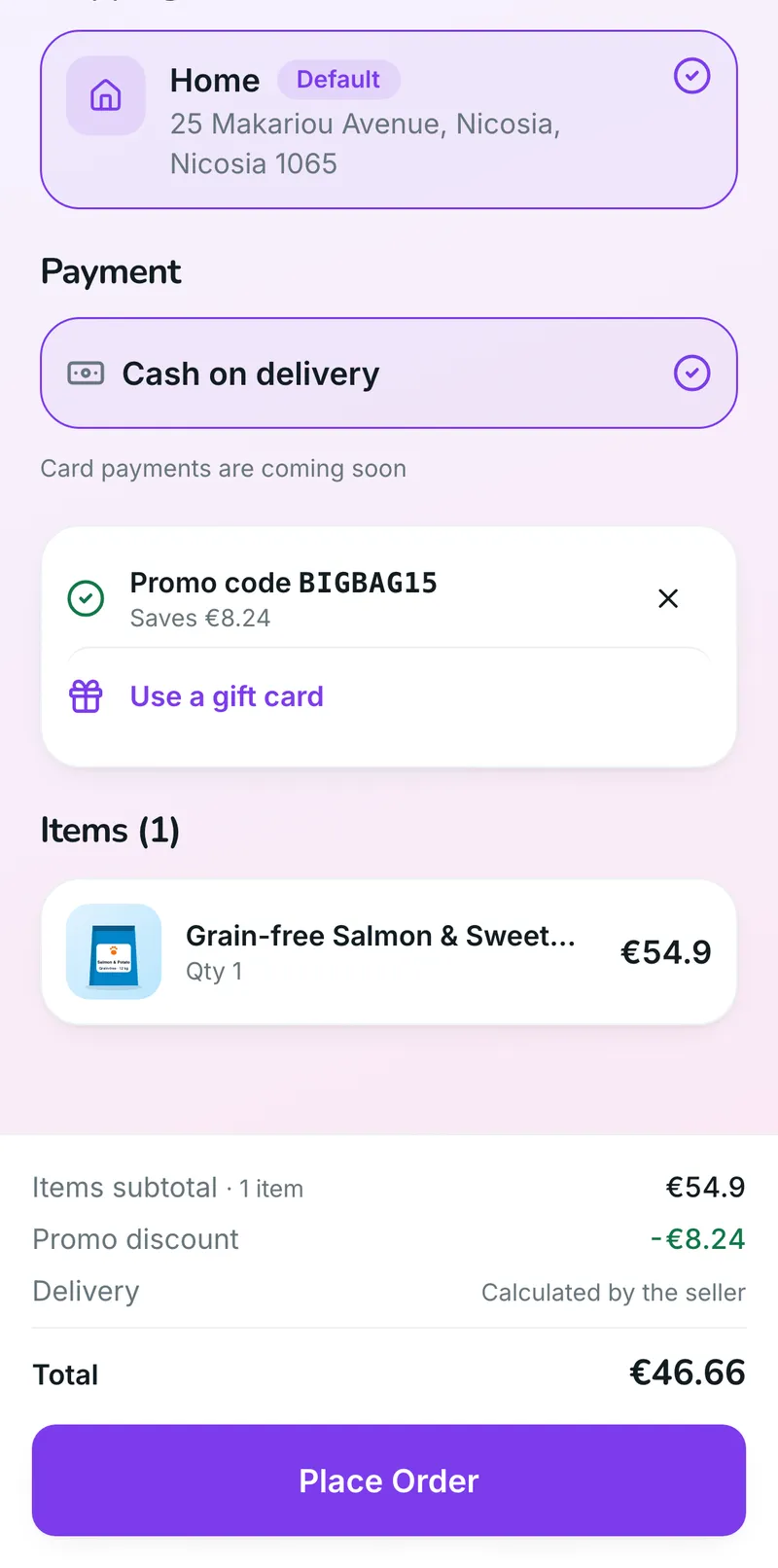
  2. 2Check out with your discount code

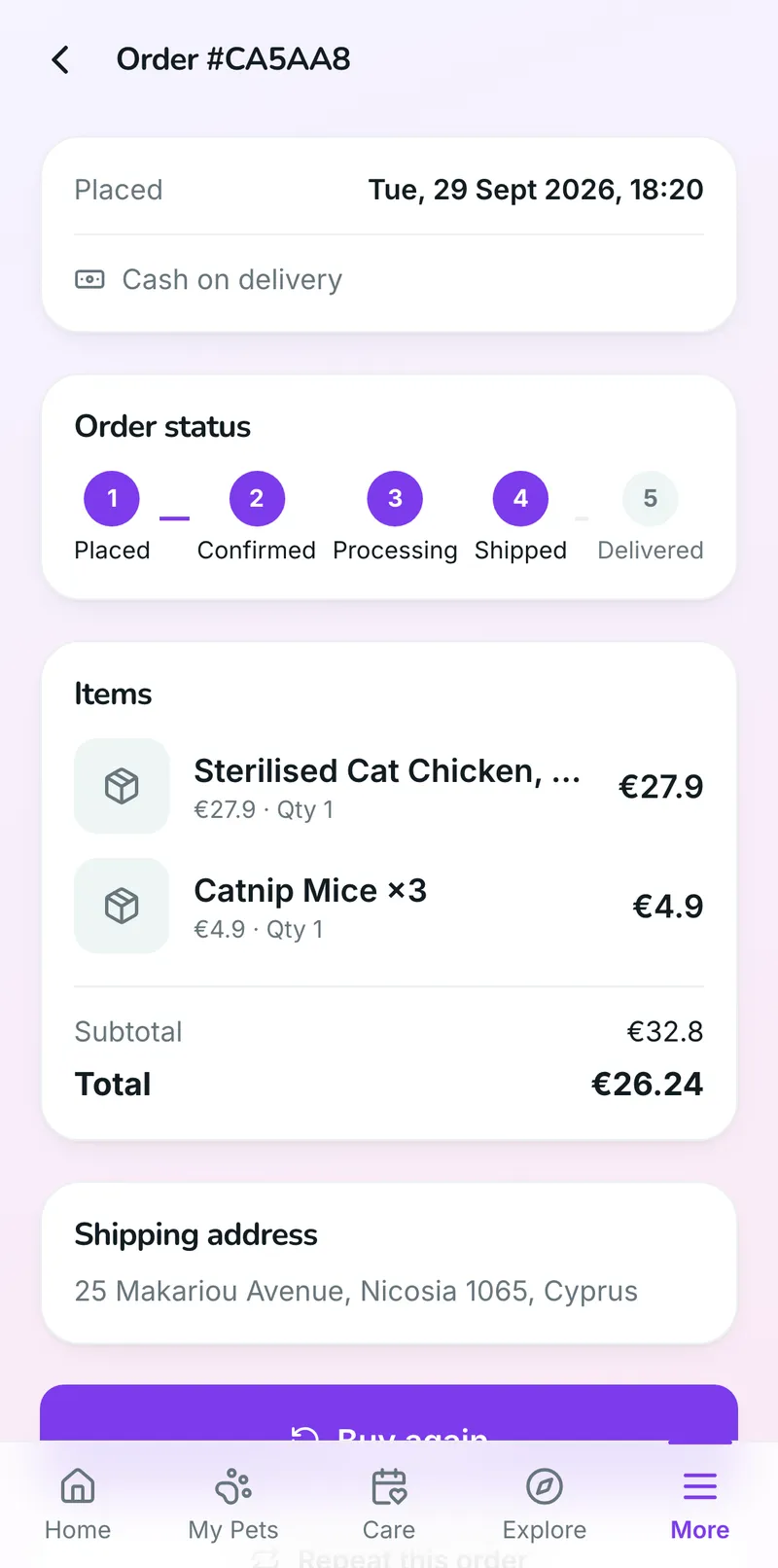
  3. 3Follow the order to the door

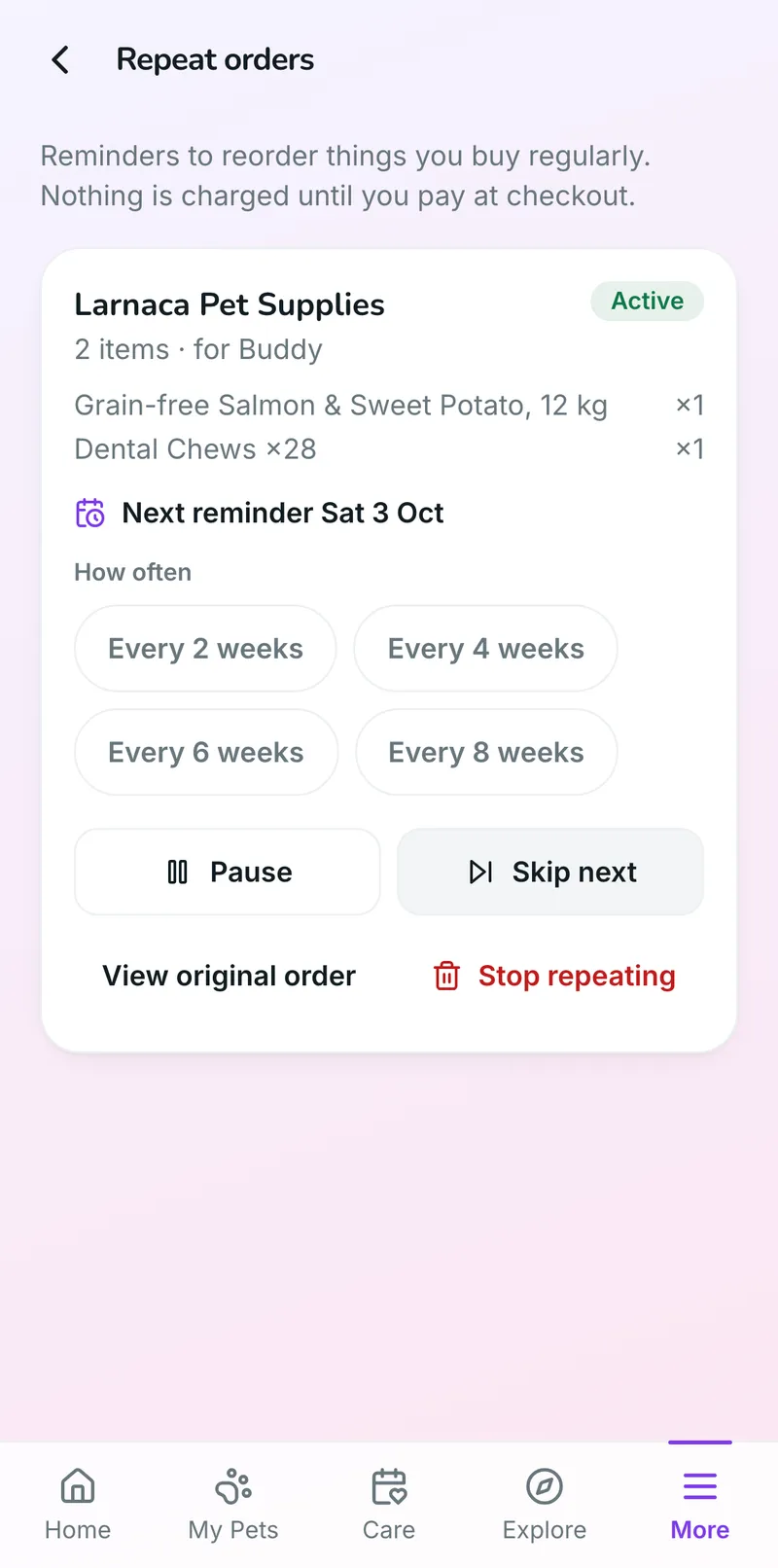
  4. 4Set it to repeat

  • Search every shop at onceOne search box across the products of every shop on Petifly, with Food, Toys, Health and Accessories filters, sorted by price or name.
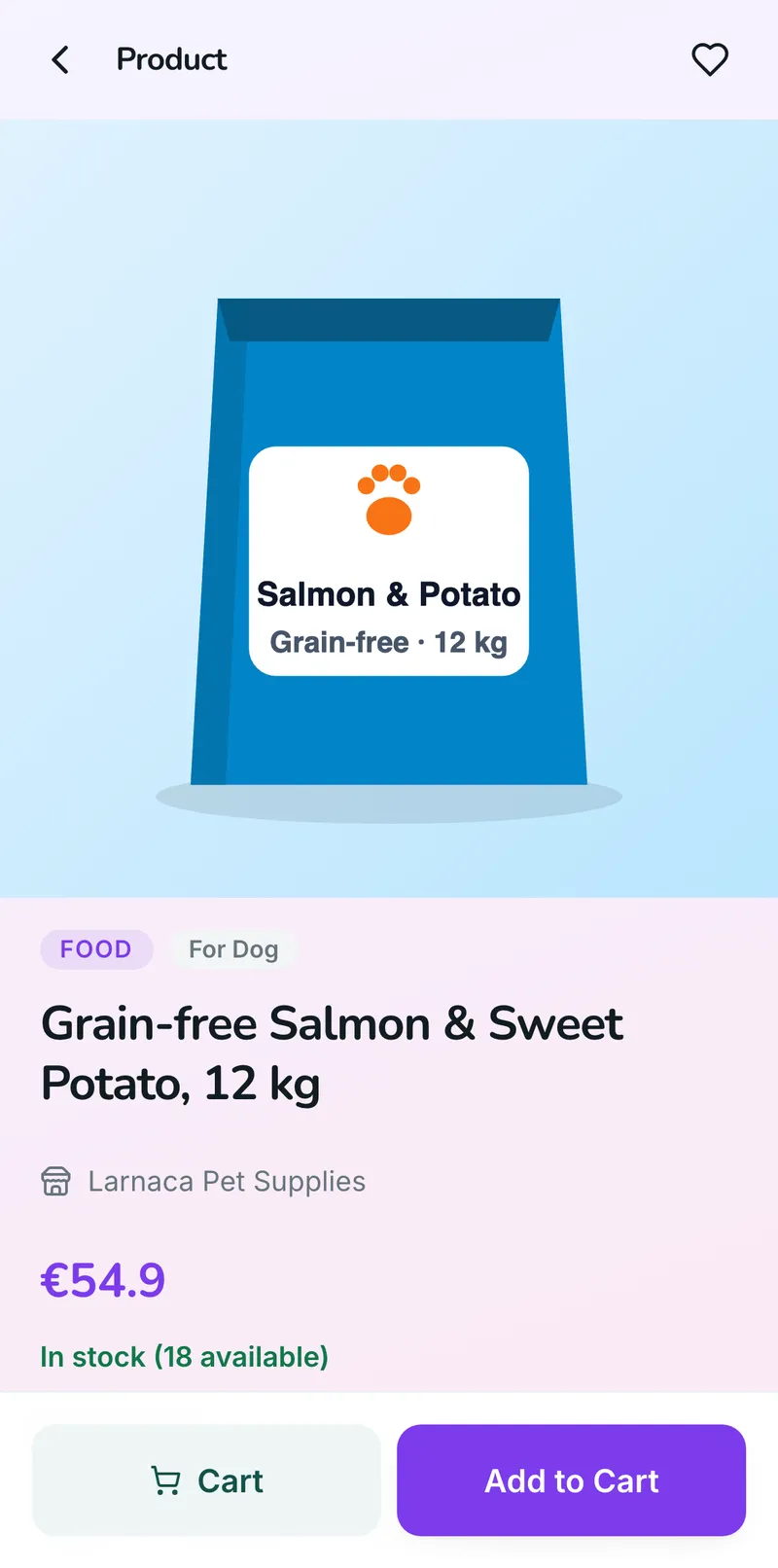
  • See what’s in stockEvery product shows how many are available, and sold-out items are marked before anyone puts them in a basket.
  • Use your offersYour discount codes and gift cards apply at checkout, and the saving shows before they pay.
  • Buy in the appA basket and checkout for your shop, paid by card in the app when you accept cards, or cash on delivery.
  • Follow the orderPlaced, confirmed, processing, shipped and delivered, with a notification at each step and an invoice to download.
  • Buy the same again“Buy again” refills the basket in one tap, or they set the order to repeat with a reminder every 2, 4, 6 or 8 weeks.
  • Find you nearbyUnder Shops in Explore and on the map, with directions, a call button, your hours and a message button.
  • Save their favouritesOwners heart the products and shops they come back to, and find them all in one list.
  • Know when food is running lowOwners log the bag and the daily portion in their pet’s health book, and the app warns them before it runs out.
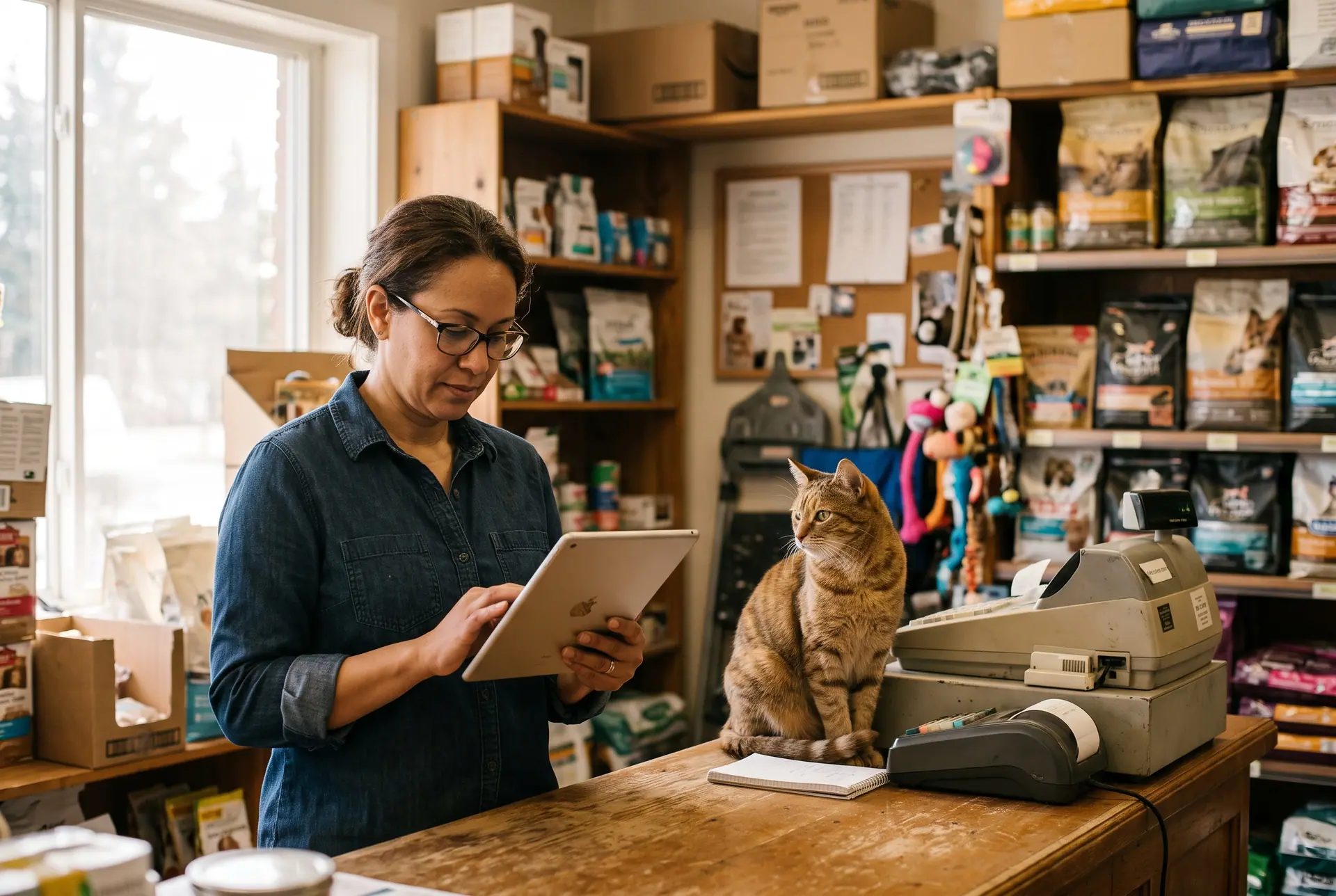
A pet shop owner checking a tablet behind the counter with a cat sitting beside the till.

They order on their phone. It’s on your screen before they’ve put it away.

Every order, message, payment and review from the app lands in the same dashboard you run the shop from: no second system, nothing to copy across.

In your dashboard

One dashboard for the whole shop

Your products and stock, your orders and customers, your money and your offers, in one place and all fed by the app. Here is what a shop runs from it, screen by screen.

Products & stock

Your shelves online, and always right

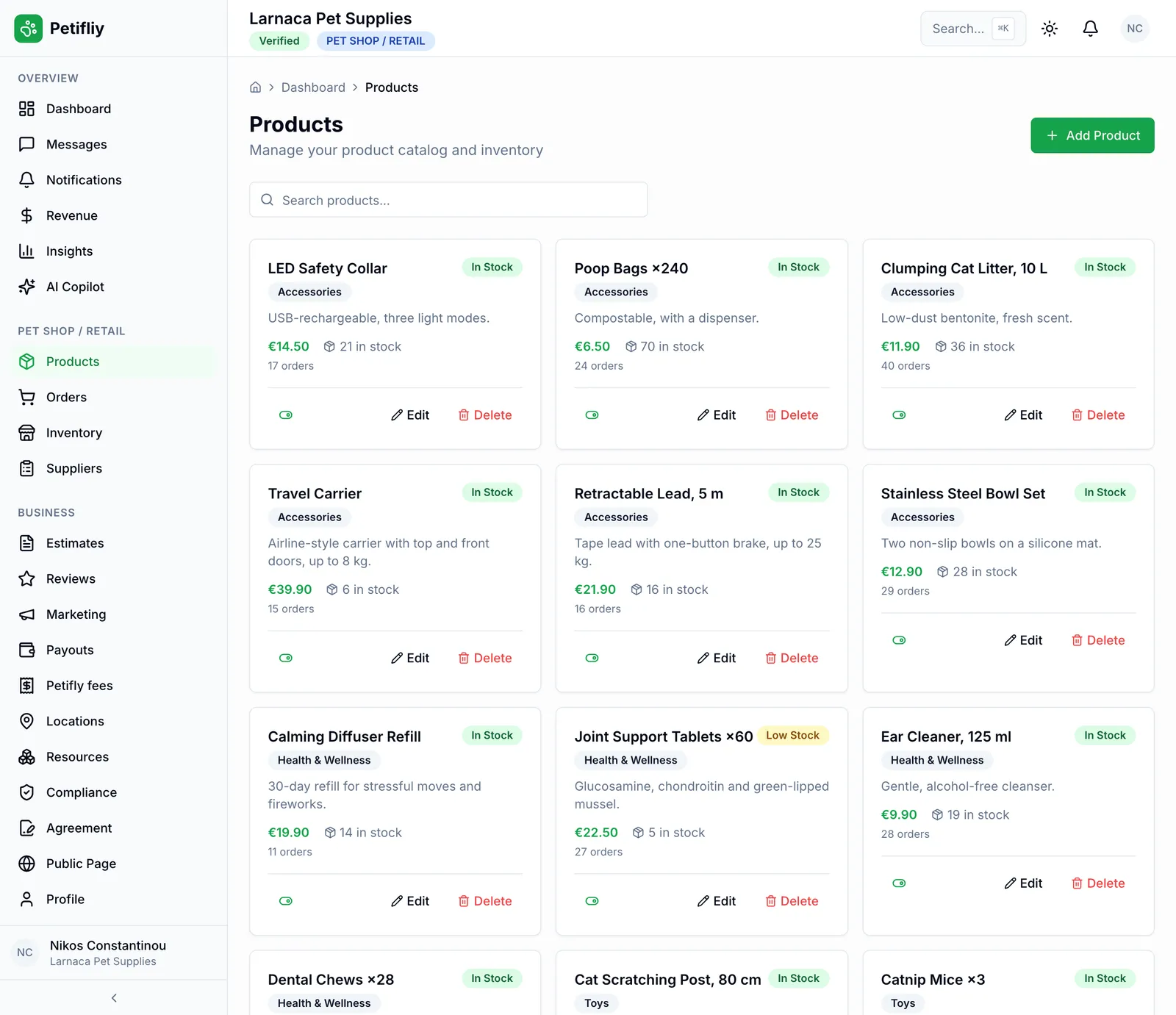
Add each product once (name, category, price, description and stock) and it’s on your page and in the app’s shop. Every product shows its stock and how many times it has been ordered, so you see at a glance what sells.

  • Your catalogueFood, treats, toys, health, accessories and more, each with a price, a description and an on/off switch.
  • Stock that counts itselfStock goes down with every order and back up when one is cancelled; adjust it by hand when a delivery comes in.
  • Low-stock alertsAnything down to five units is flagged on your dashboard and in Inventory, and sold-out items have their own tab.
  • See what sellsEvery product shows how many times it has been ordered, so the best sellers stand out, and so do the slow ones.

Orders & customers

Every order, every customer, one list

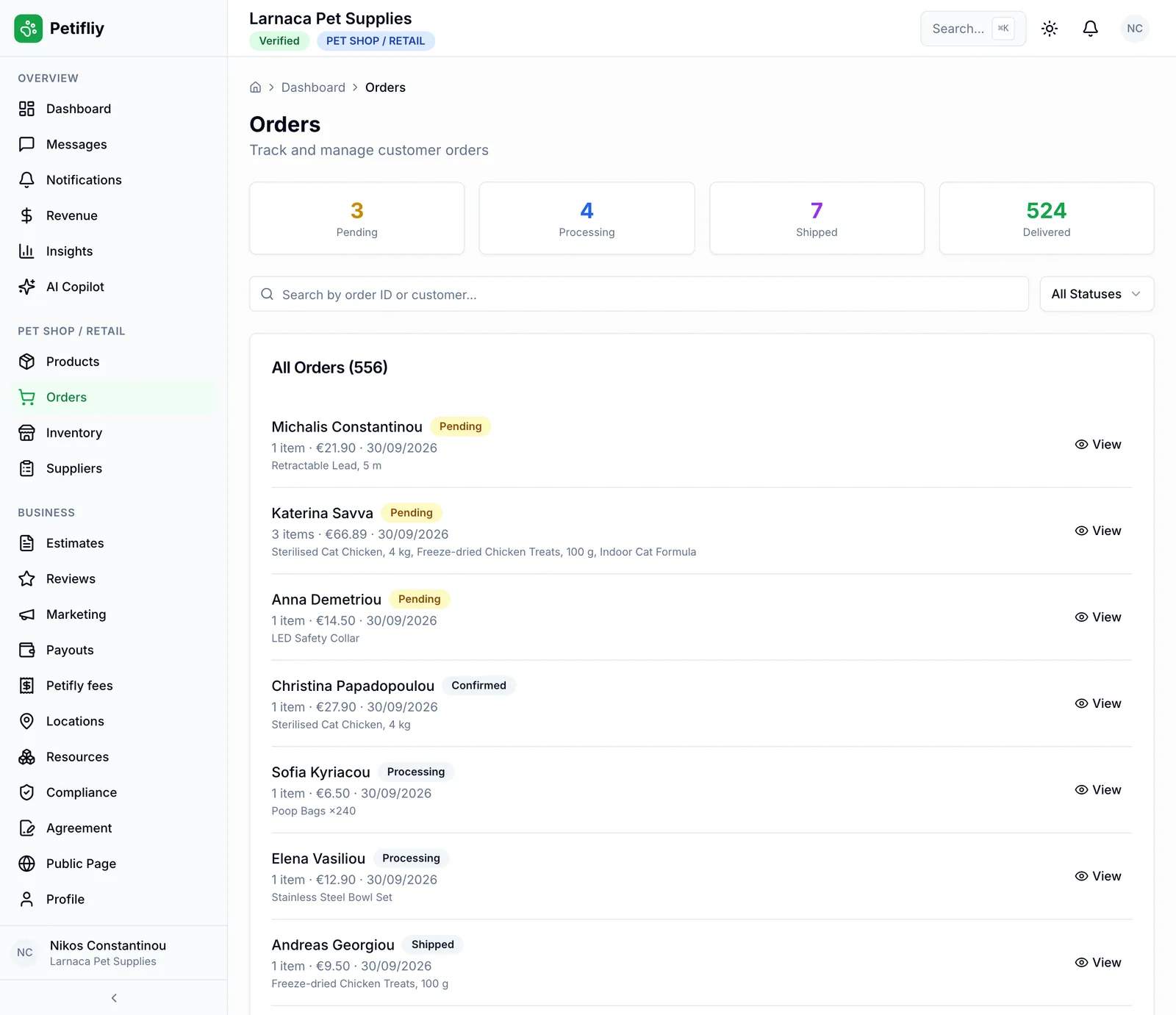
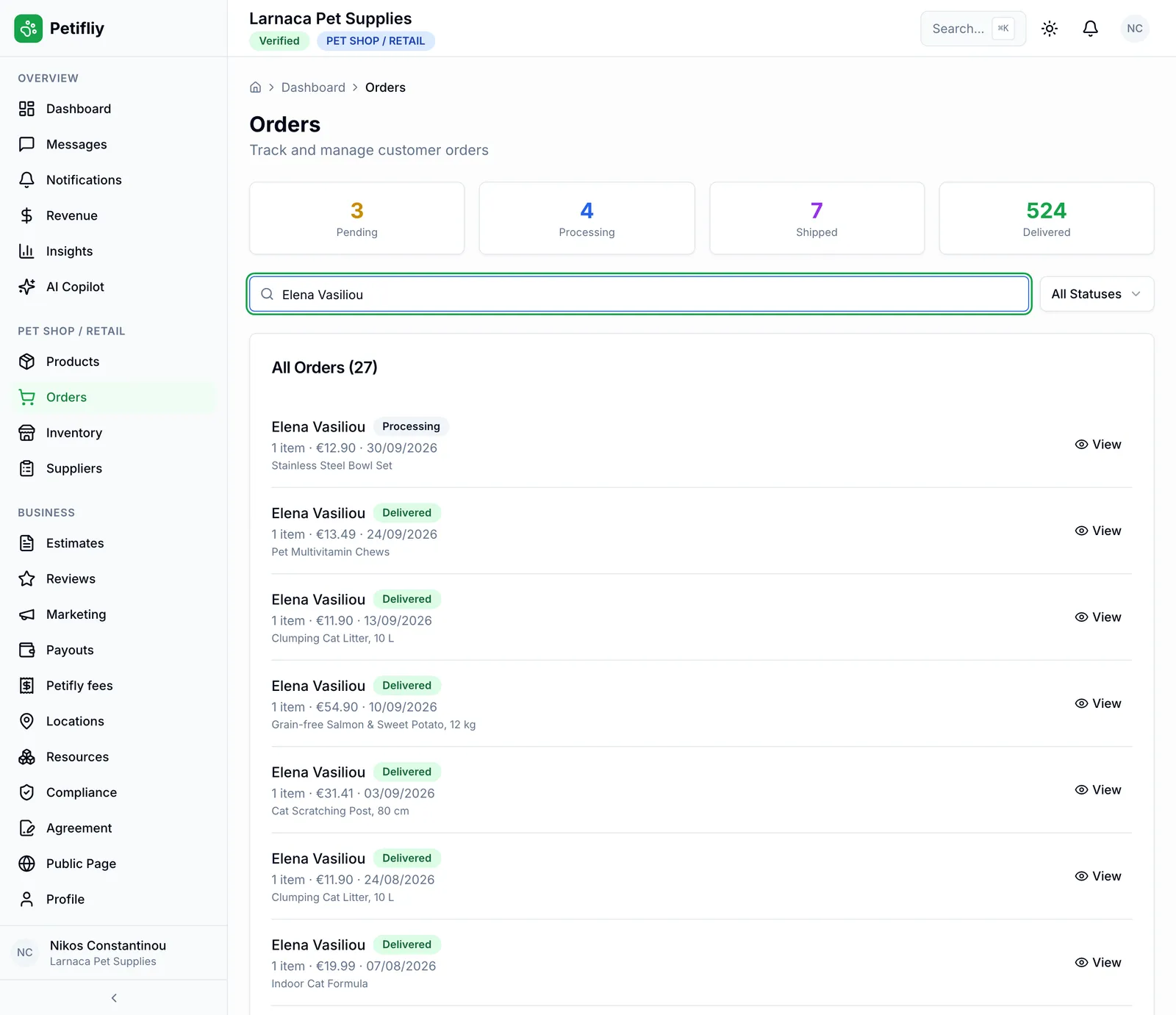
Orders from the app arrive with the customer, the items, the total and the delivery address. Move each one from confirmed to processing, shipped and delivered, and the customer sees every step on their phone.

  • Orders by statusPending, processing, shipped and delivered at a glance; search by order or customer, or filter by status.
  • Know your customersName, email and delivery address on every order, and everything a customer has bought one search away.
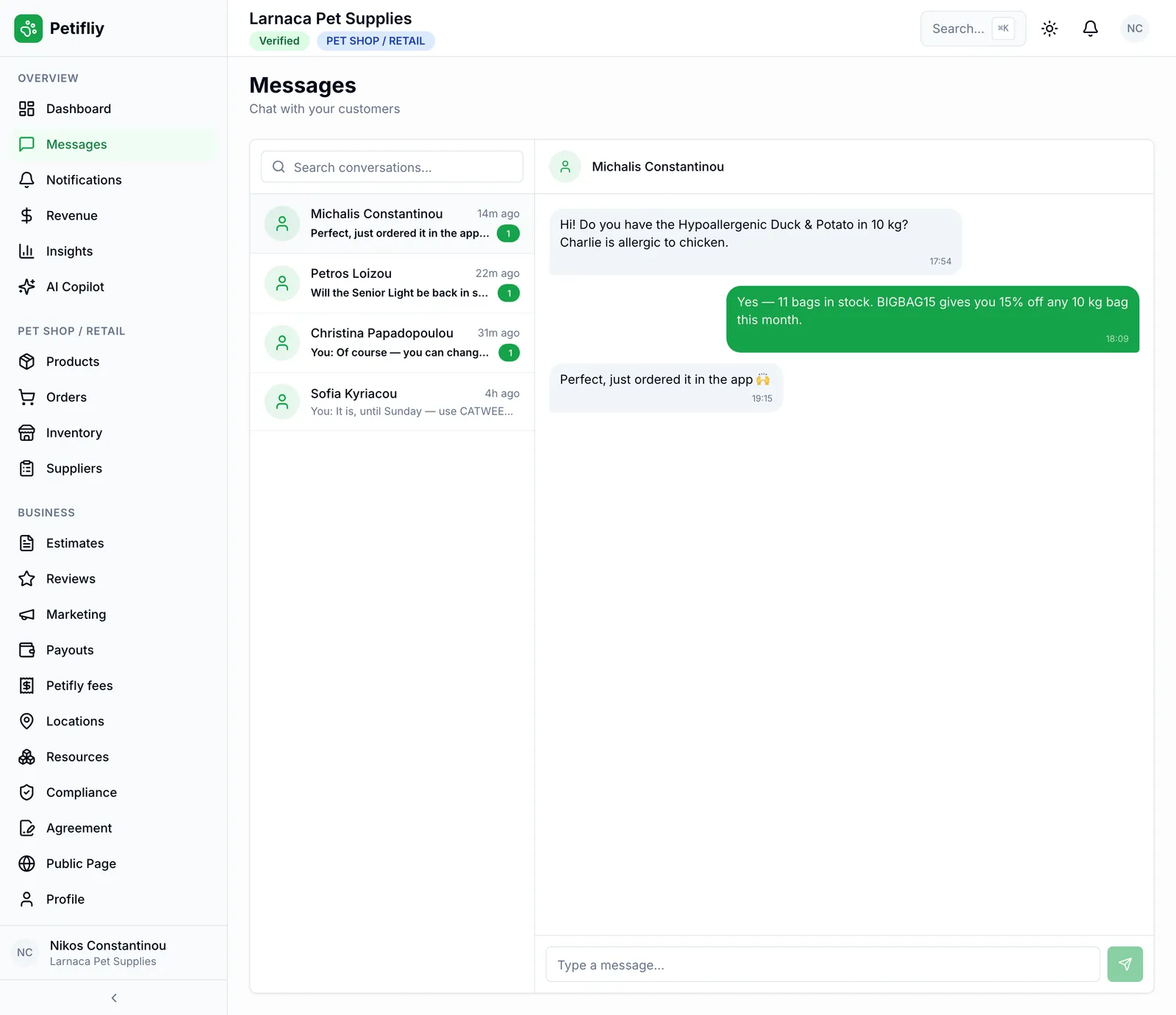
  • MessagesOwners write from your page in the app and you answer from the dashboard: stock questions, codes, special requests.
  • Reviews & repliesRead every rating and comment, reply to each one, and export them all.

Sales & money

Sales and payouts, without a spreadsheet

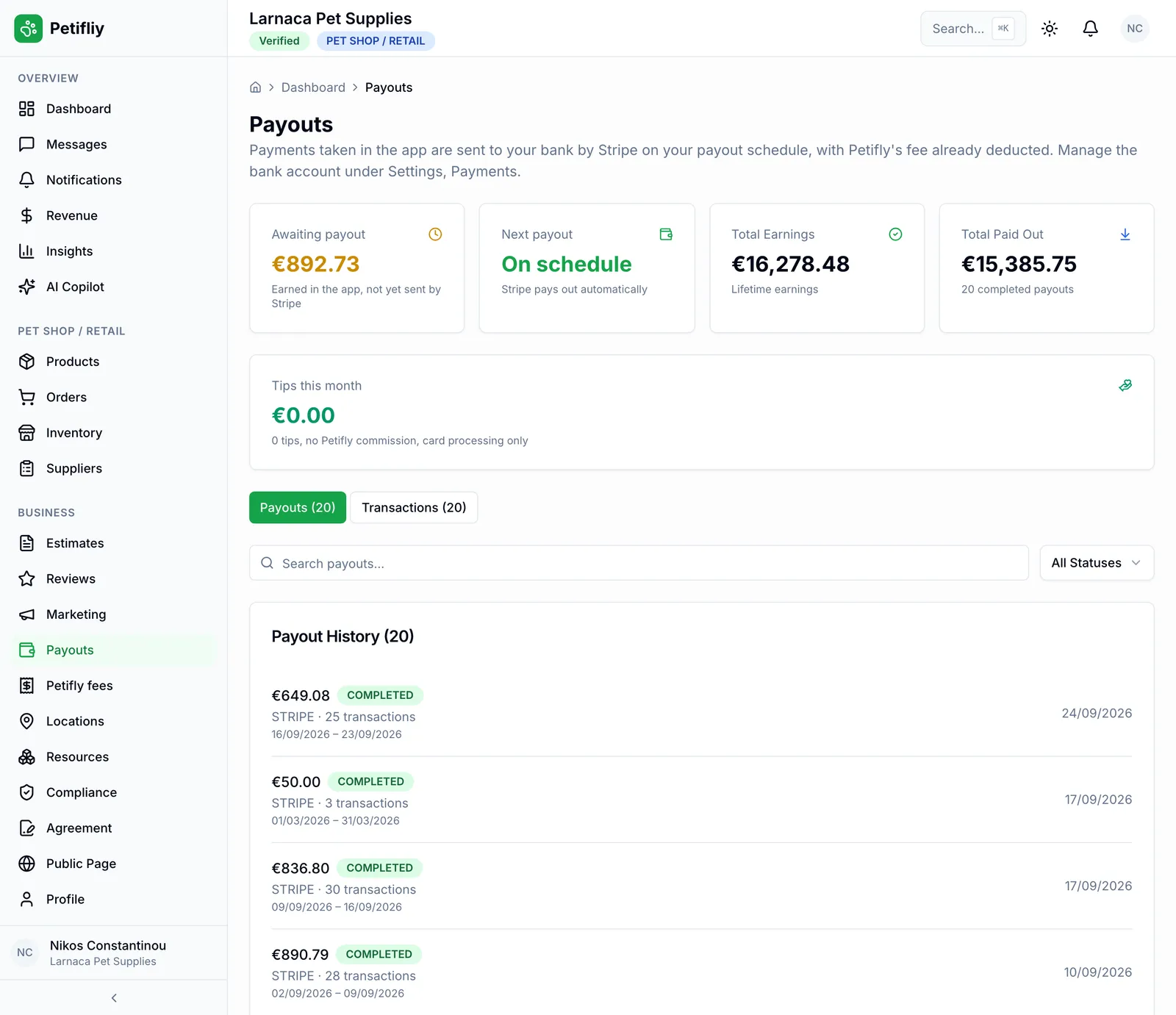
Your sales add up on their own: order revenue for the period you pick, what customers paid by card in the app, Petifly’s fees line by line, what’s net to you, and every payout to your bank with the transactions inside it.

  • Order revenueWhat your orders brought in over the last three, six or twelve months, beside card payments collected and your net.
  • Card payments in the appWhat customers paid by card, order by order and in total.
  • Payouts to your bankPaid out through Stripe on a schedule, with what’s waiting and what’s been paid.
  • Fees in plain sightPetifly’s fees shown line by line, so the net figure is the one that reaches you.

Discounts & offers

Run an offer this afternoon

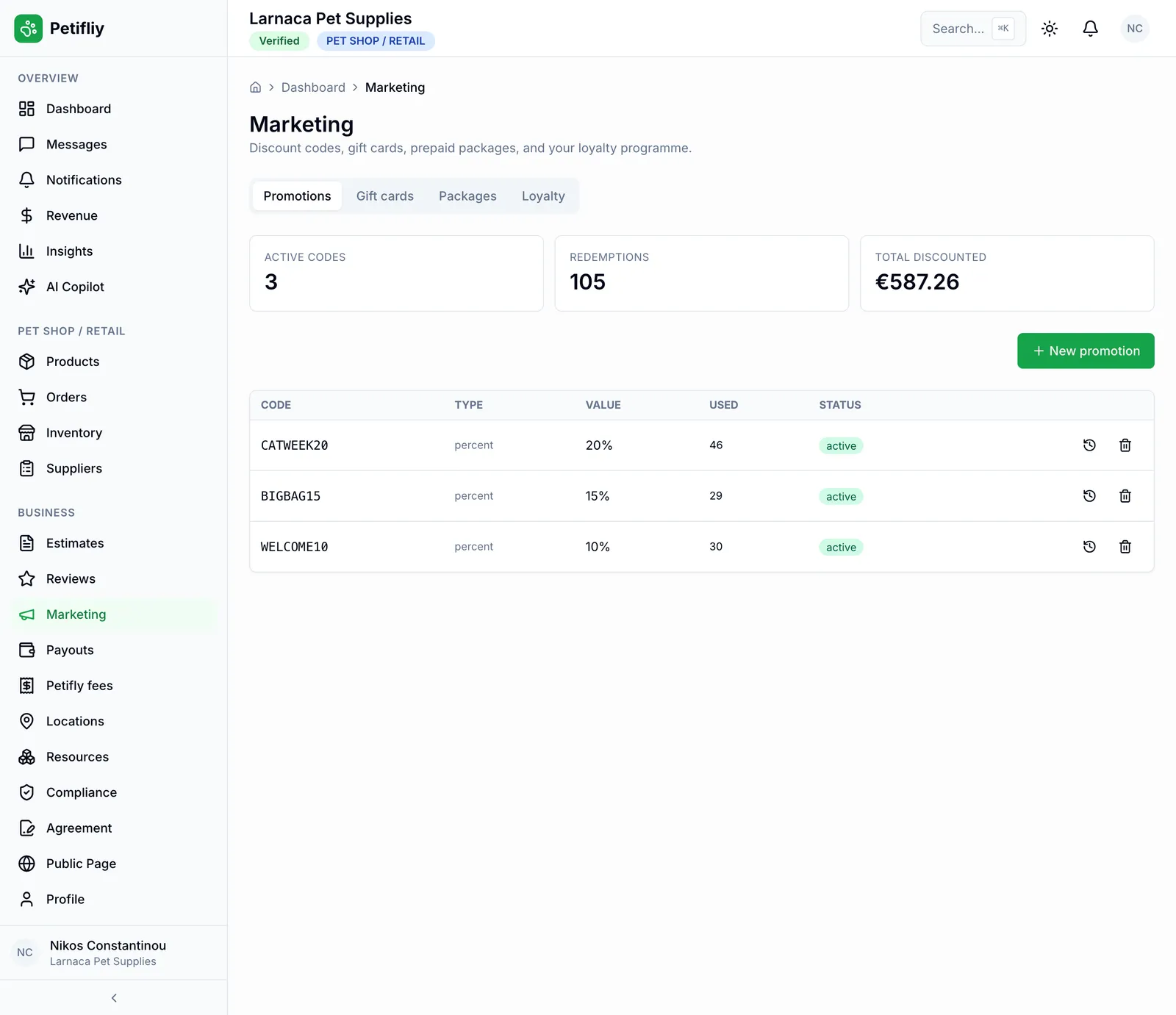
Create a discount code (a percentage or an amount off, with a minimum spend, dates and usage limits) and it works at checkout in the app straight away. See how often each code is used and how much it has saved your customers.

  • Discount codesPercent or euro off the whole basket, with a minimum spend, start and end dates, and limits per customer.
  • Every use countedEach code’s uses and total discounted, with every customer who used it, when, and how much they saved.
  • Gift cardsIssue gift cards for the counter or for a customer; they spend them at checkout and you see what’s left on each.
  • Share them where owners arePut a code in a message, a review reply or on your counter. It works for anyone who orders from you in the app.

Customers who come back

Regulars, without chasing them

Food, litter and flea treatment run out on a schedule. Petifly keeps the next order coming: every order stays on record, owners reorder in a tap, and the app reminds them when it’s time.

  1. 1

    They order

    From your products in the app: by searching, from your page, or with “Buy again” on a past order.

  2. 2

    You send it

    The order moves from confirmed to processing, shipped and delivered in your dashboard, and on their phone at the same time.

  3. 3

    They set it to repeat

    One tap turns an order into a repeat every 2, 4, 6 or 8 weeks, for the pet it’s for.

  4. 4

    The app reminds them

    When the next one is due (or the food they logged is running low), the app nudges them, and the basket is one tap away.

…and step one starts again: nothing charged without them, nothing for you to remember.

Данные и соответствие

Сделано под европейские правила, а не подогнано под них потом

Кто видит историю животногоИстория · одно животное
Владелец
полный доступ, всегда
Ваш бизнес
только когда открыли
Pet AI
читает внутри аккаунта
Все остальные
нет доступа
  • Согласие фиксируется, с датой
  • Удаление уже есть в приложении
  • Никакой другой бизнес не видит вашу работу
  • Ваши записи остаются вашими: их можно выгрузить или удалить

Мы с радостью проведём вашего специалиста по защите данных по всей модели обработки до того, как что-либо будет запущено.

Get started

Open your shop in an afternoon

No hardware, nothing to install, no website to build. Fill in the basics in the dashboard, add your products, and once your account is verified, owners can find you and buy from you.

Not sure how to set up your catalogue or your first offer? Talk to us first. We’ll walk you through it and set it up with you.

See every kind of business on Petifly
  1. 1Create your business accountChoose Pet shop / Retail.
  2. 2Complete your profileLogo, description, phone and address: what owners see on your page.
  3. 3Set your opening hoursSo your page shows when you’re open and owners know when to find you.
  4. 4Add your productsName, category, price, description and how many you have in stock.
  5. 5Sign the agreement and go liveAccept the partner agreement, connect payouts if you want card payments, and your shelves are in the app.

Put your shop in the pocket of every pet owner nearby

One dashboard for the shop, one app for your customers, and every order, message and payment between them in one place.

  • No hardware, no installation
  • Live stock on every product
  • Payouts straight to your bank