For event organizers, clinics, shops & rescues
Your pet event, in the pocket of every pet owner nearby
Post it once and it’s in the Petifly app for the owners around you. They see how many are going, share it with their friends, register or buy tickets in the app and show a QR code at the door. You run the whole event from one dashboard.
- Free or ticketed, in person or online
- Tickets paid in the app, to your account
- QR tickets checked at the door
- Updates pushed to everyone who’s coming
- kinds of event, from adoption days to dog shows
- 8
- designs for your event page
- 4
- QR code per order, checked at the door
- 1
- languages, everywhere
- 3
Not only for event companies
Any pet business, rescue or charity can run events
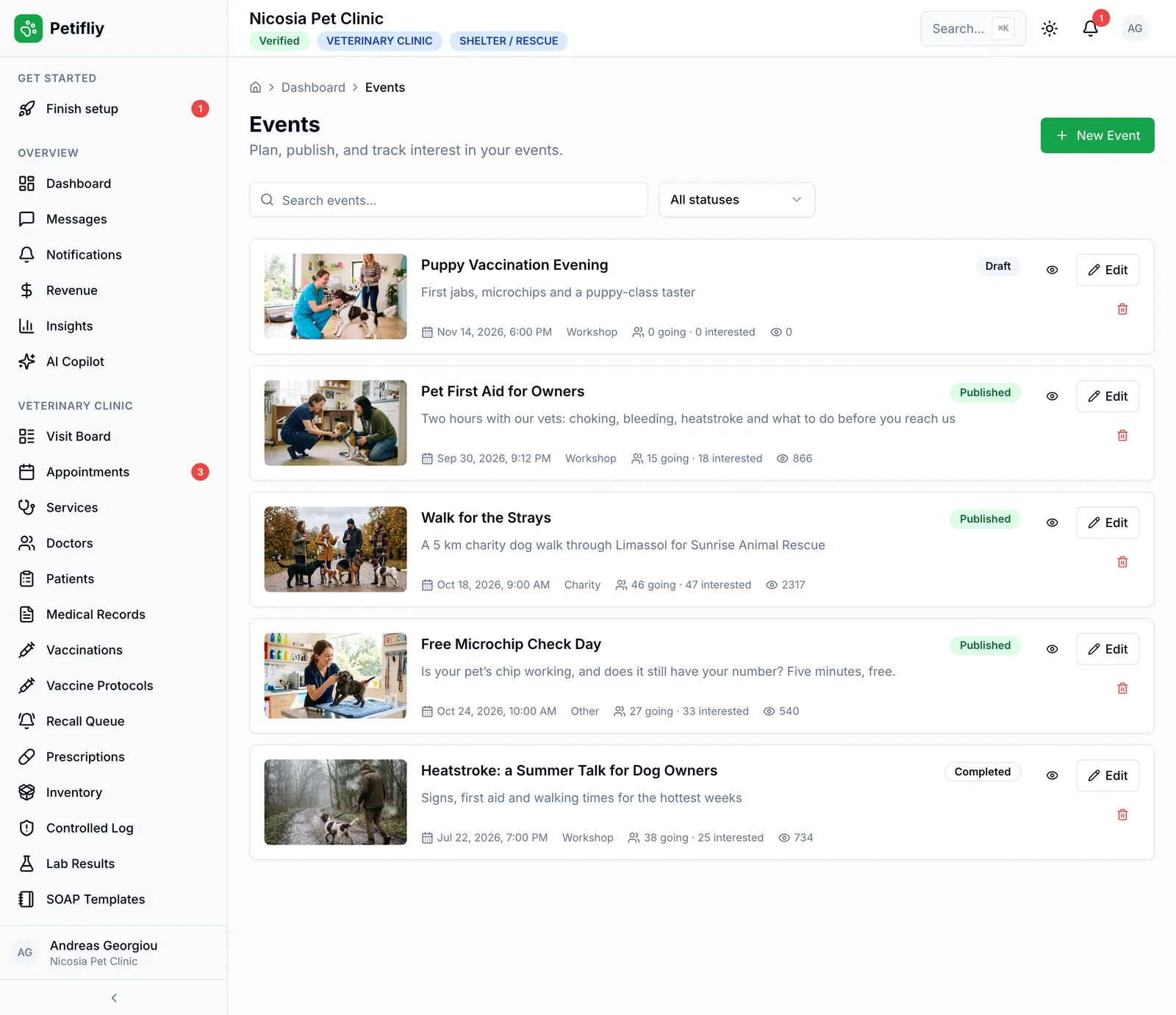
Events are how people meet you before they need you. A clinic’s first-aid evening, a salon’s grooming class, a shop’s puppy meetup, a rescue’s adoption day: on Petifly they’re all posted the same way, found in the same place, and run from the same dashboard as the rest of your work.
Vet clinicsFirst-aid workshops, microchip check days, puppy vaccination evenings and talks for owners. Groomers & salonsGrooming classes, dog shows and open days, in the salon, online, or both at once. Pet shopsPuppy meetups, product days and live Q&As with the people who choose what goes on the shelves. Event organizers & trainersCompetitions, exhibitions, training days and meetups. Choose Event organizer when you sign up and Events is built into your dashboard. Shelters & rescuesFor the animalsAdoption days, open days, volunteer days and fundraisers that bring people to the animals. Charities & non-profitsFor the animalsCharity walks, awareness days and collection drives, free to join or ticketed to raise money.
Eight kinds of event
- Meetup
- Adoption drive
- Training
- Competition
- Charity
- Exhibition
- Workshop
- Other
Not only for business
An adoption day gets the same tools as a paid workshop
Some of the best events on Petifly aren’t selling anything. A rescue’s adoption day is listed, mapped, shared and counted exactly like a clinic’s workshop. A charity walk can sell its tickets in the app, with the money going to the organizer’s account.
- Free events with a simple registration: name, contact and how many are coming, straight into your attendee list.
- Sponsors and partners on the event page with their logos and links: a shop can put its name to the food, a clinic to the health checks.
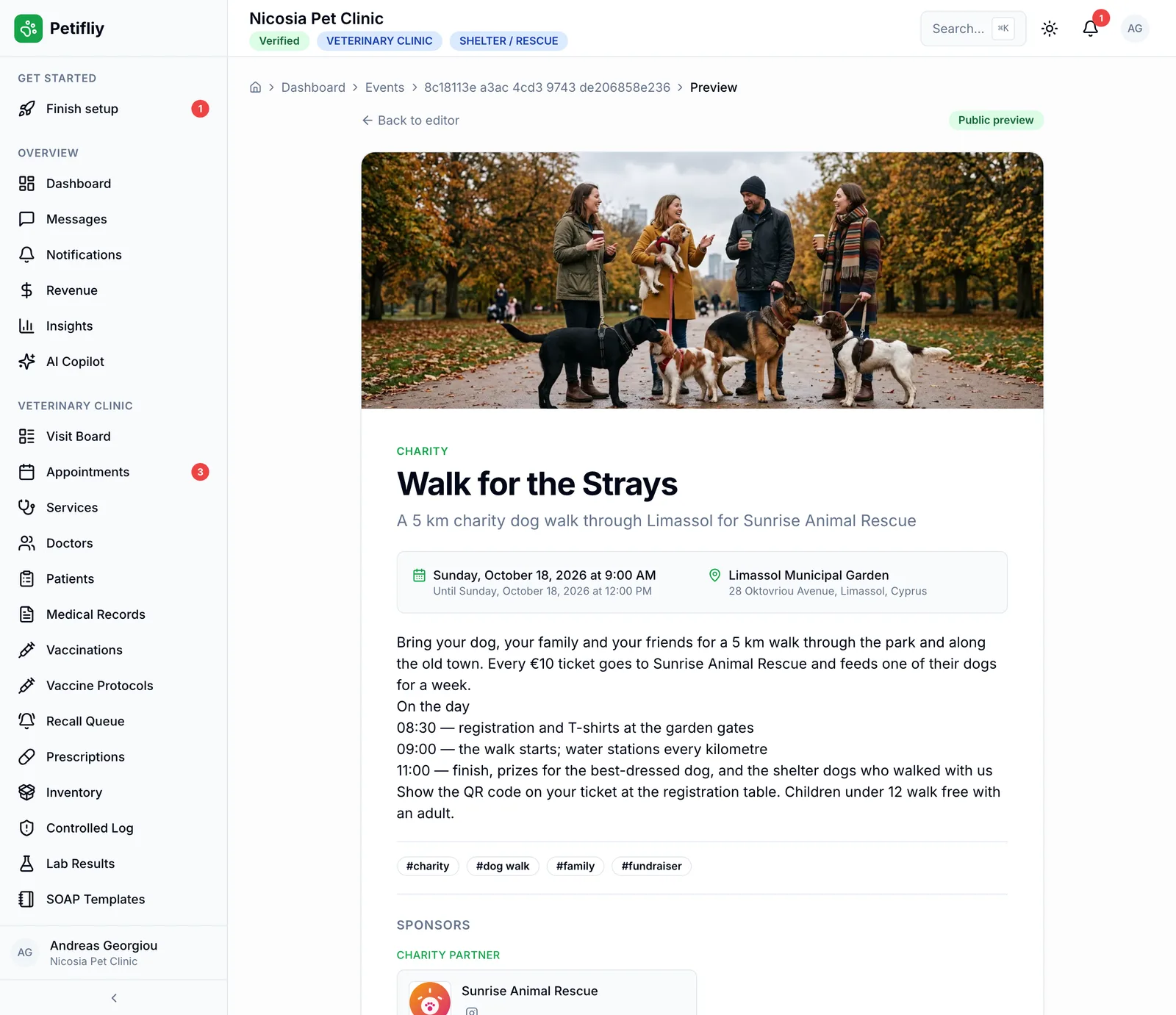
- Businesses and rescues can team up: the Walk for the Strays is run by a clinic, for a rescue, with a salon and a shop as sponsors.
- Owners pass it on to the people they know, so it reaches beyond the people who already follow you.
Shelters and rescues: tell us you’d like to run events and the Petifly team switches them on for your account.
Open to everyone
A post reaches your followers. An event on Petifly reaches the pet community.
The moment you publish, your event is where pet owners already look: in the Events list, near them, on the map. And every owner who sees it can pass it on (to a group chat, a friend, their calendar), so it travels well beyond the people who already know you.
What a social post gives you
- Seen by a slice of your followers, for a day
- RSVPs in comments, messages and a spreadsheet
- No way to reach everyone when the plan changes
- Tickets sold somewhere else, and ticked off a printed list
Your event
Published on Petifly
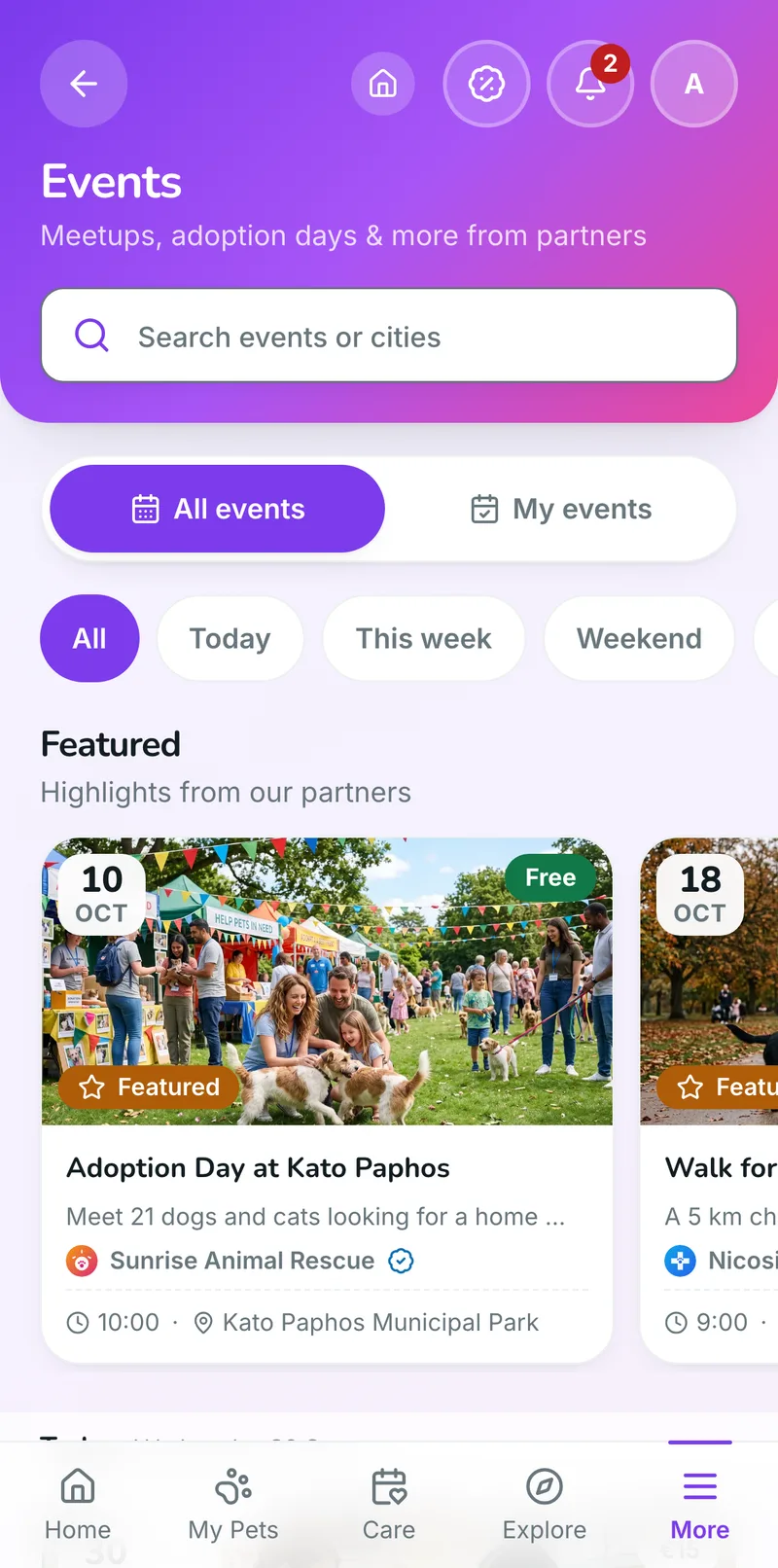
- The Events listGrouped by day, with Today, This week and Weekend filters and a search by event or city.
- Near themWith Near me on, owners see the events within 50 km, closest first.
- On the mapEvery event with a venue gets a pin on the Petifly map, alongside the pet places owners already use.
- FeaturedThe Petifly team can feature an event at the top of the list, for everyone.
- Shared by ownersOne tap opens their phone’s share sheet (WhatsApp, Viber, Messenger, email) with “Join me at…” and a link to your event.
- In their calendarAdd to calendar puts it in Google Calendar or any calendar app, with the time and the place.
In the owner’s app
Everything about your event, in the app they already use
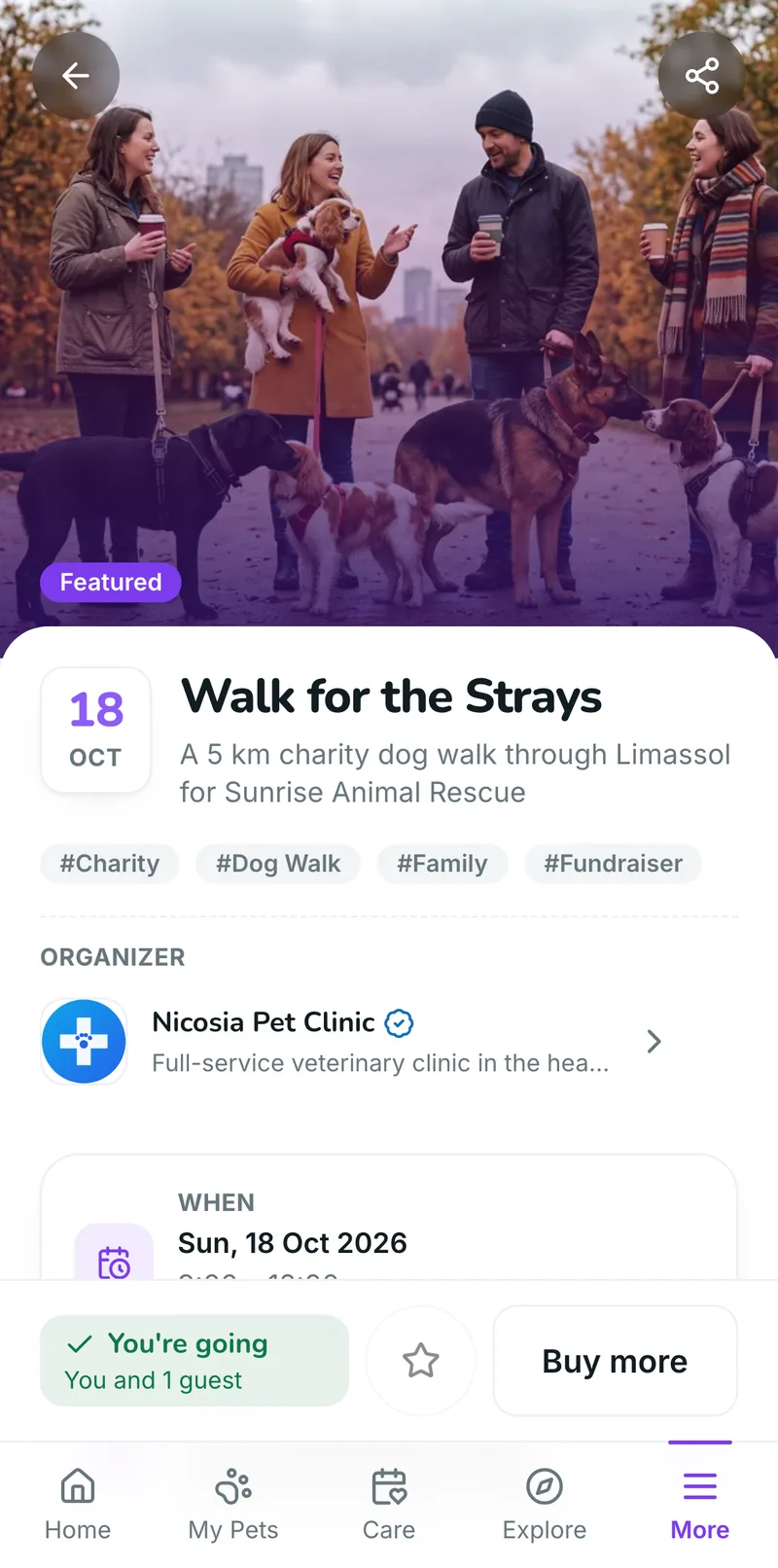
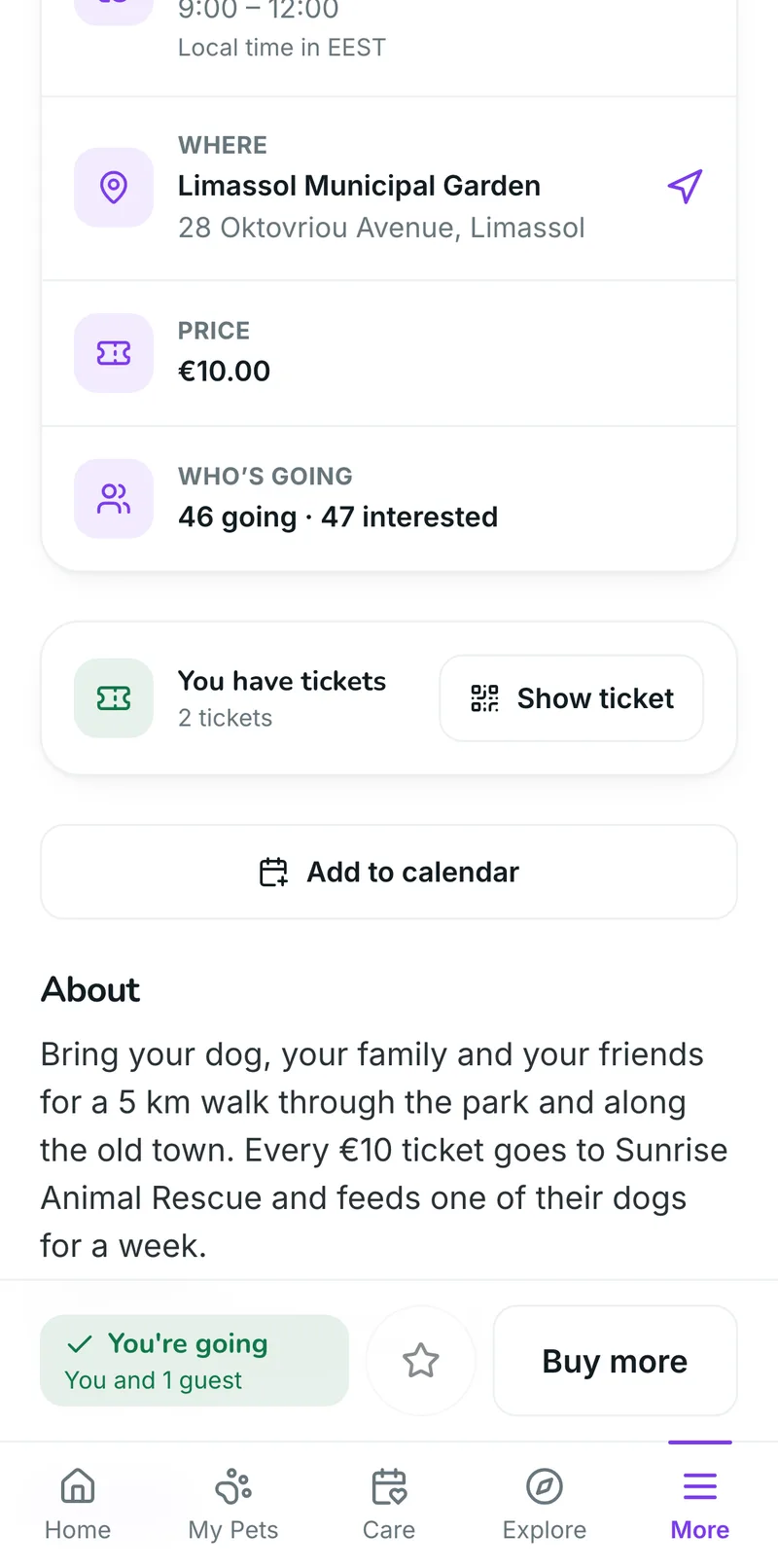
Owners don’t download anything new. In the Petifly app they find your event, see when and where, what it costs and who else is going, register or buy a ticket, and get your updates. Every answer lands in your dashboard.
Who’s going
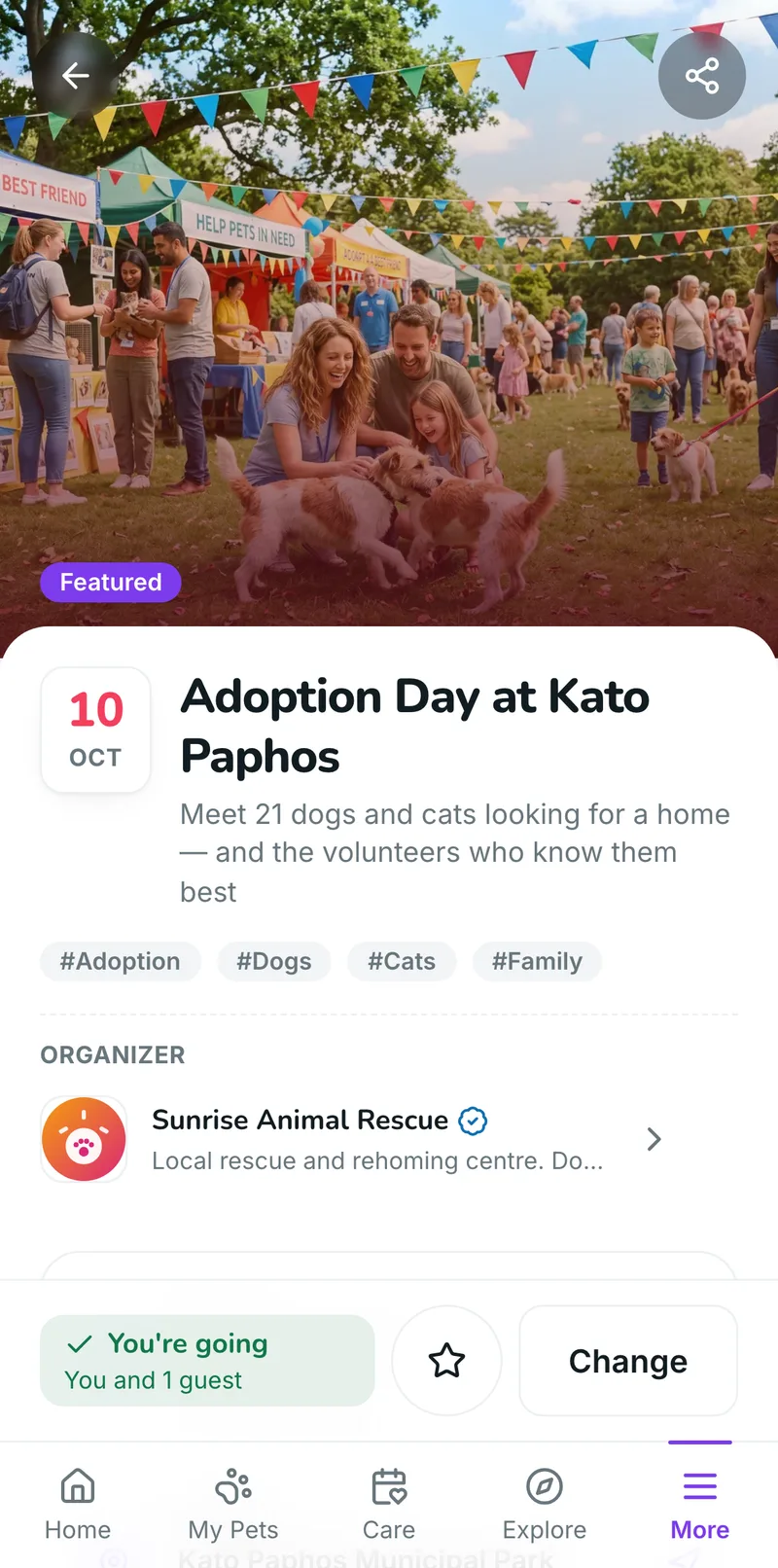
Every event shows how many people are going and how many are interested, updated with every answer, so owners can see at a glance that your event is where people will be. You see the same numbers, and the names, in your dashboard.
From finding it to walking in, in the app
1See when, where and the price, plus who’s going
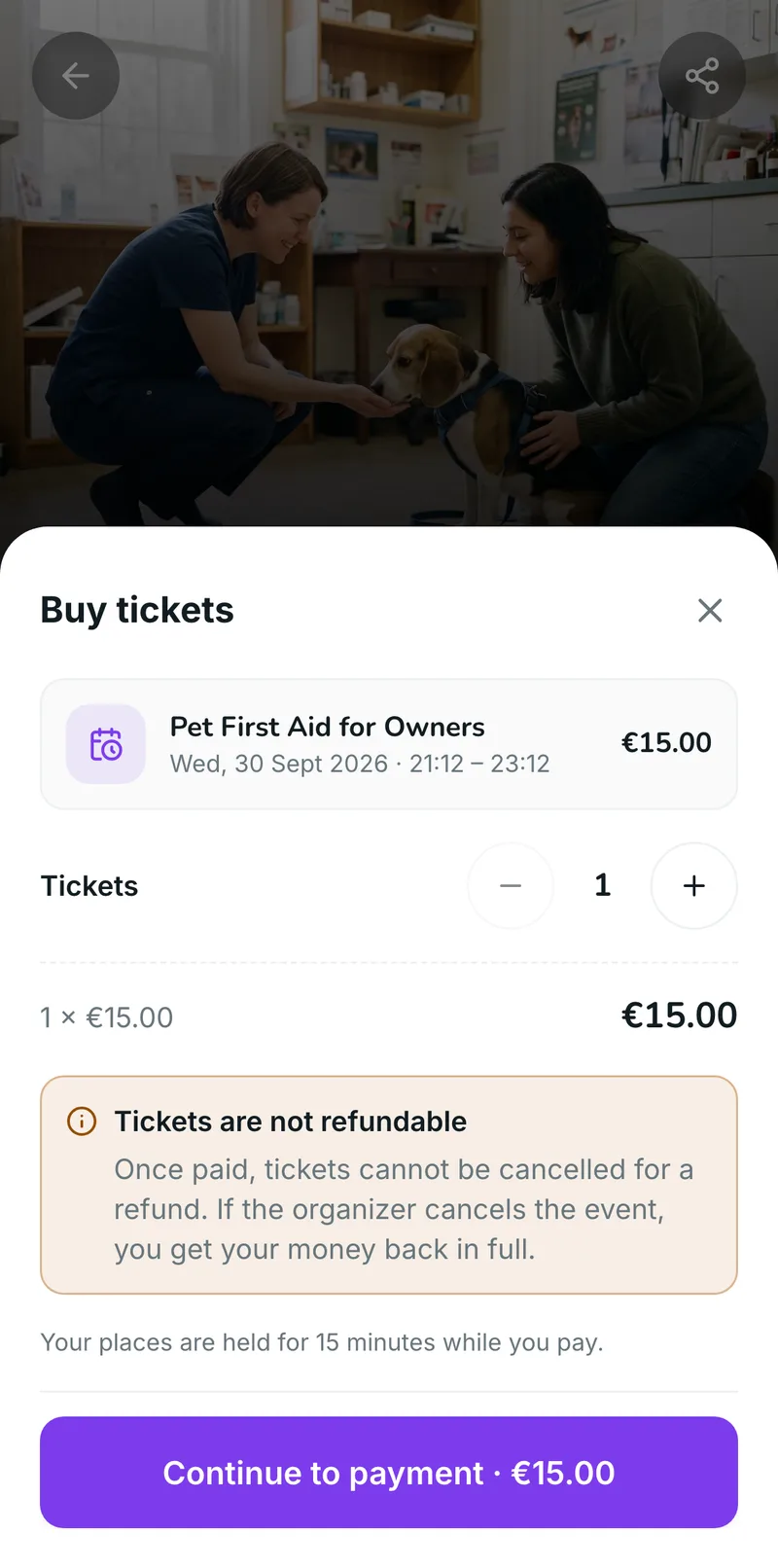
2Buy tickets in the app
3Show the QR code at the door
4Keep every event in one place
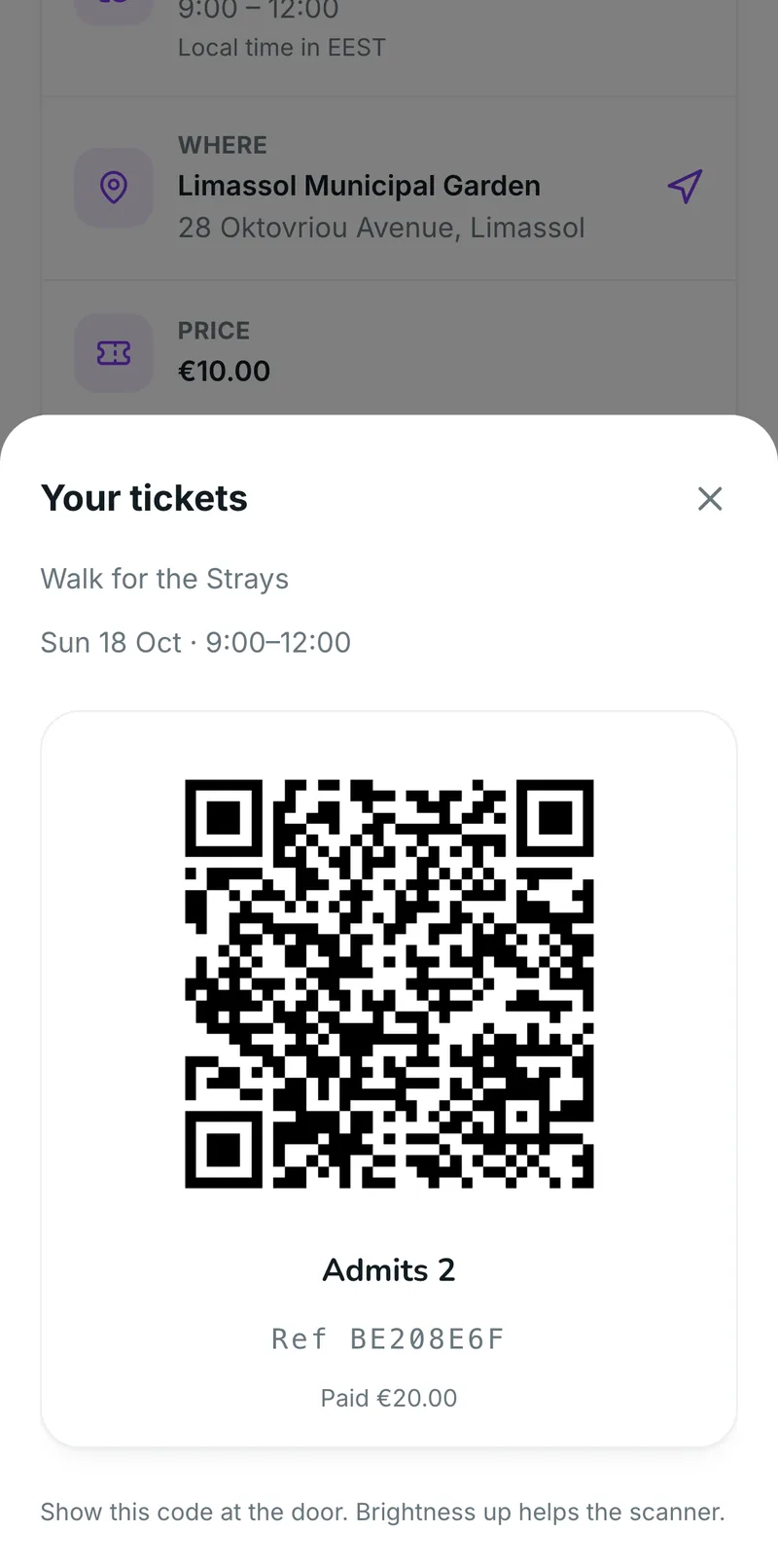
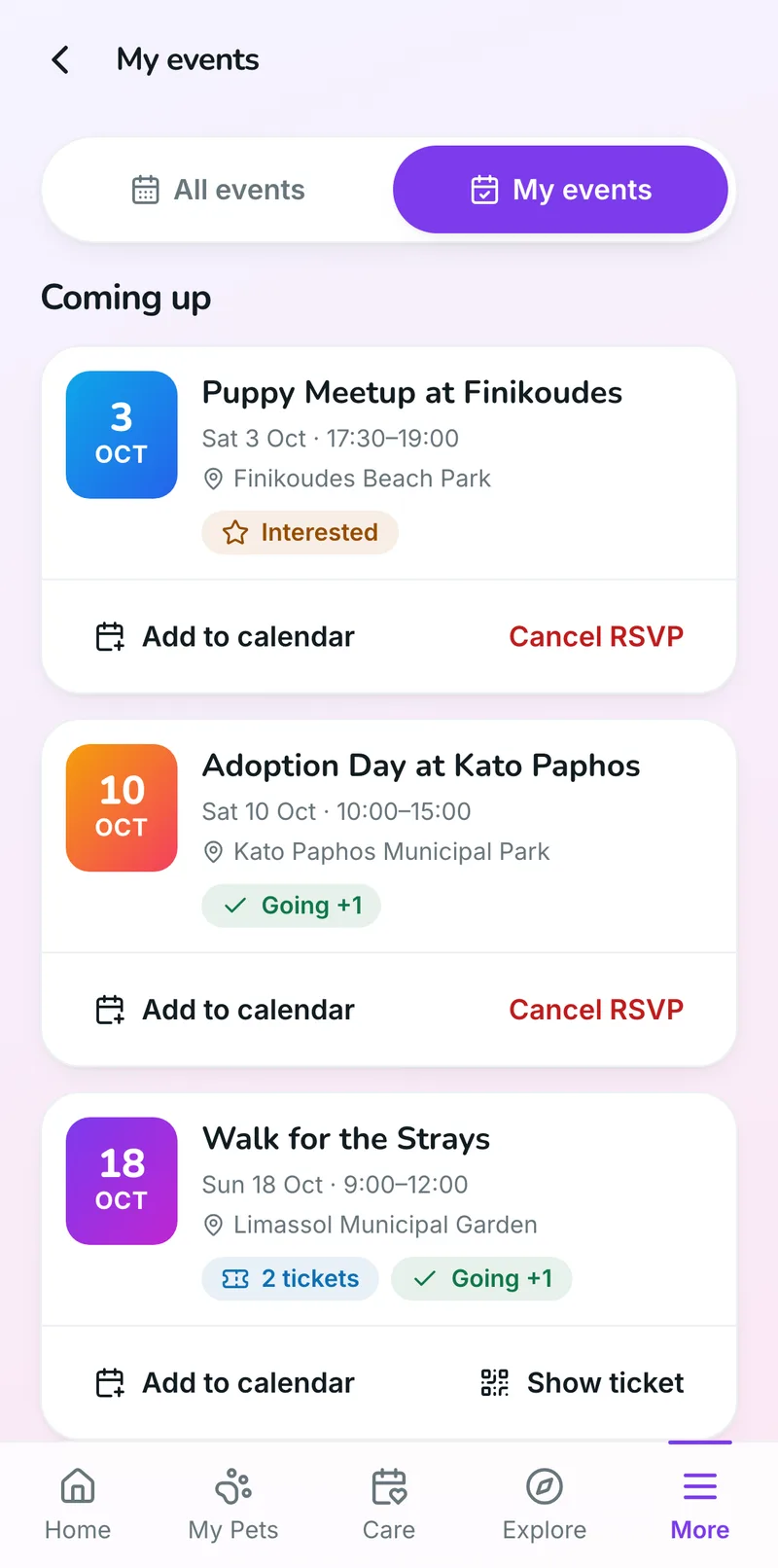
- Find events nearbyBy day, with Today, This week and Weekend filters, a search by event or city, and Near me.
- See who’s goingHow many are going and how many are interested, on every event page.
- Mark it InterestedOne tap keeps it in My events, and your updates reach them from then on.
- Register for free eventsA short form (name, contact, how many are coming, a note) and they’re on your list.
- Buy tickets in the appPaid by card, up to 20 per order, with their places held for 15 minutes while they pay.
- A QR ticketOne code per order, admitting everyone on it, confirmed by notification and email.
- Share it anywhereWhatsApp, Viber, Messenger, email: any app on their phone, with a link back to your event.
- Directions and calendarDirections in Google Maps, the join link for online events, and Add to calendar.
- Hear from youYour announcements arrive as a notification and stay on the event page.

Post it once. The pet community finds it, shares it and turns up.
Every registration, ticket and check-in lands in the same dashboard you run your business from: no second ticketing site, no spreadsheet on the day.
In your dashboard
One dashboard for the whole event
The page, the places and the price, the updates, the sponsors and the door, in one place and all fed by the app. Here is what running an event looks like, screen by screen.
The event page
An event page that looks designed, not pasted in
Pick one of four designs, add a cover photo, and tell the story with headings, lists, pictures and video. Search the place once and the address and map pin fill themselves in. Then preview it exactly as owners will see it before you publish.
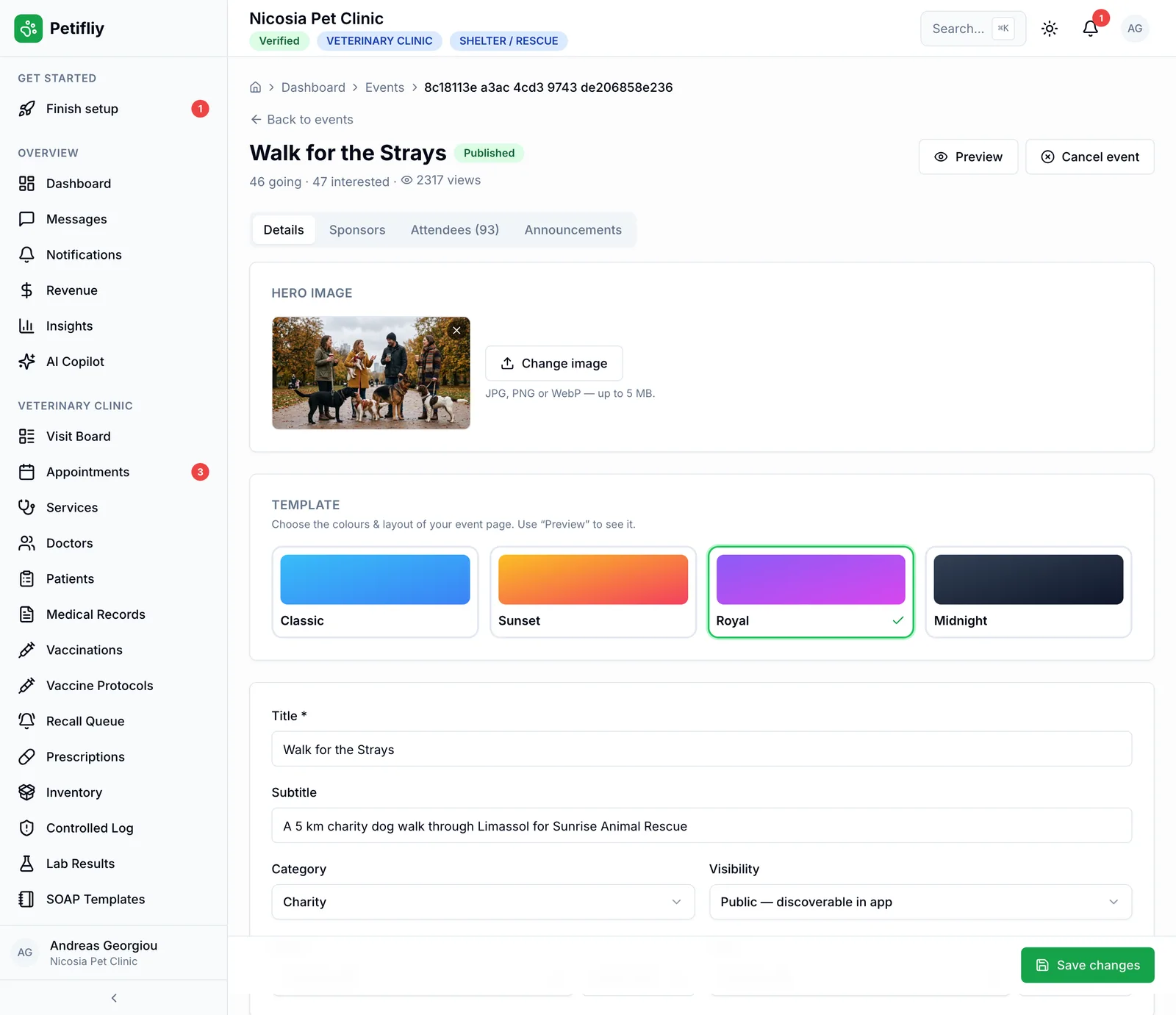
- Four designsClassic, Sunset, Royal or Midnight, with your cover photo on top.
- A proper descriptionHeadings, lists, links, pictures, and video or audio from YouTube, Vimeo, Spotify, SoundCloud or Loom.
- Search the placePick the venue, and the address, city and map pin fill themselves in.
- In person, online or bothAdd a join link for online and hybrid events; it shows on the event page.
- Public, or by link onlyPublish to the whole app, or keep it unlisted for the people you send it to.
- Drafts and previewWork on it as a draft, and preview the public page before anyone sees it.
Places & tickets
Free, or tickets sold in the app
Leave the price at zero for a free event with registration, or set a price and a capacity. Once your payouts are set up, owners pay by card in the app and the money goes to your account. The event never sells more places than you have.
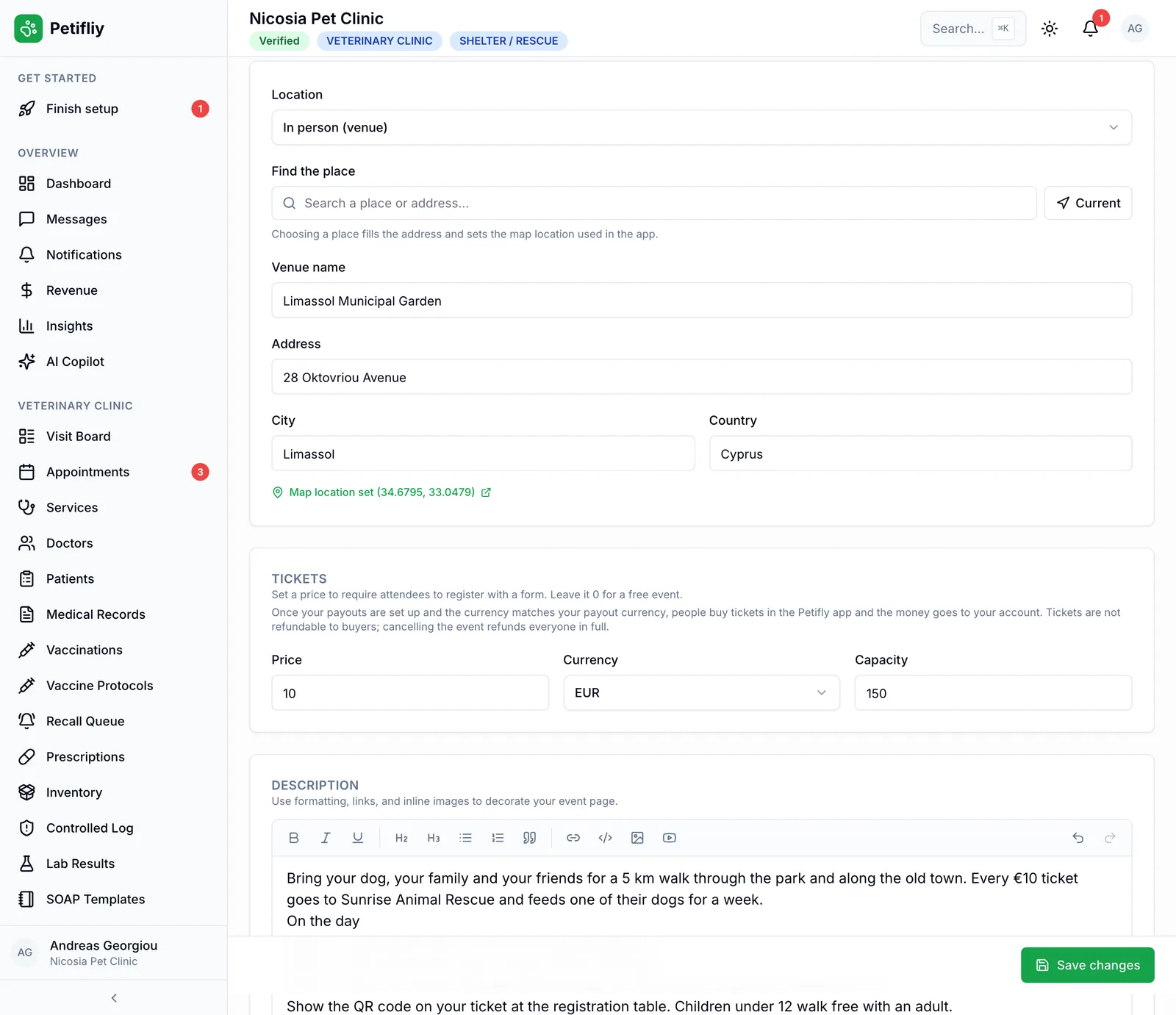
- Free, with registrationOwners register with their name, contact and party size, and you see it with their note.
- Paid in the appCard payments in the app, one price per event, up to 20 tickets per order.
- Paid to your accountTicket money goes to your connected payout account, less the usual fee, and on to your bank.
- Never oversoldCapacity counts every person (guests and places being paid for too), so the last place can’t be sold twice.
- Clear refundsTickets aren’t refundable to buyers, but if you cancel, everyone is refunded in full, automatically.
- Confirmed to the buyerEach order is confirmed by notification and email, with the QR ticket waiting in the app.
Announcements
Tell everyone who’s coming, at once
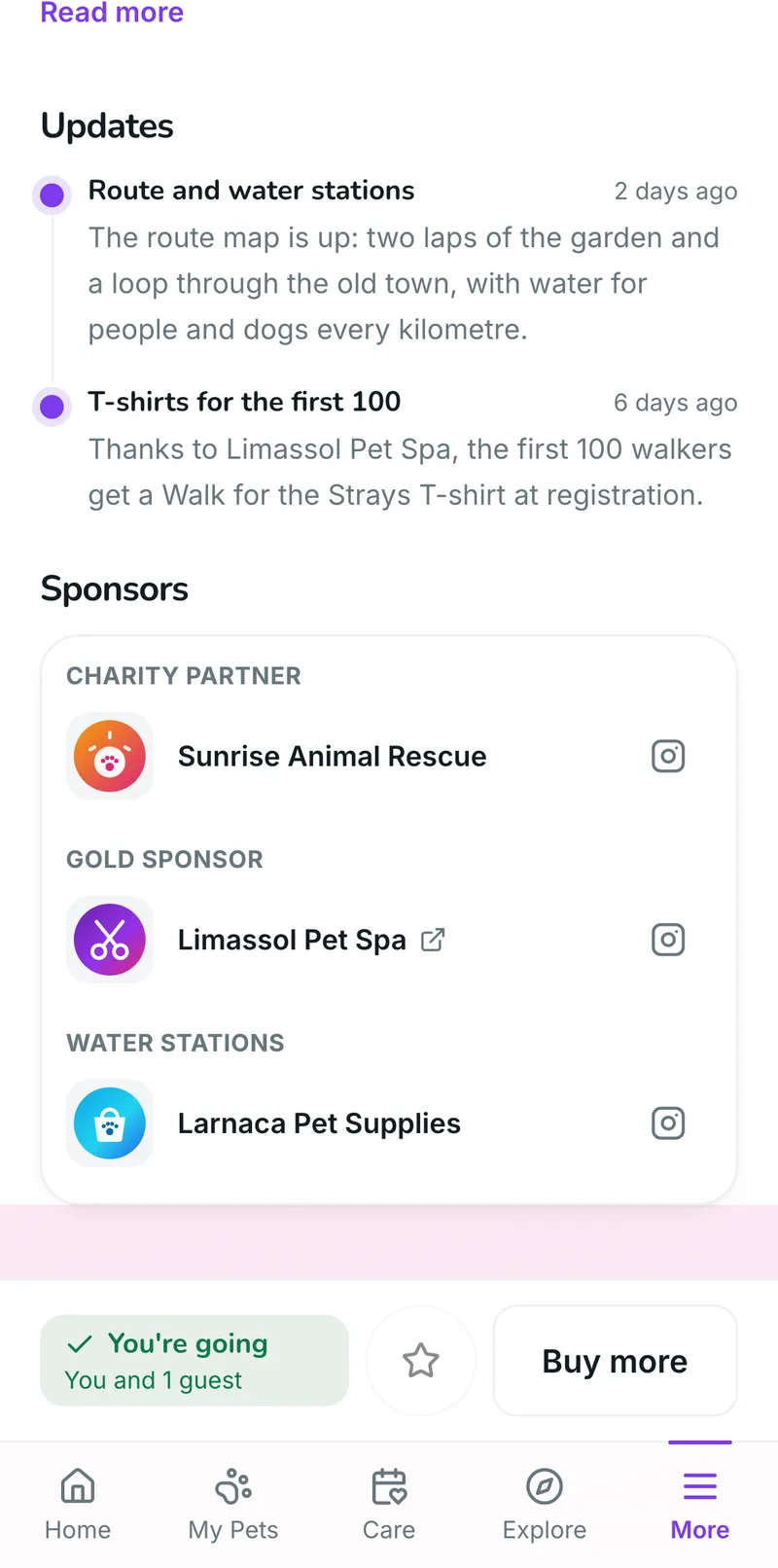
Venue moved, start time changed, T-shirts for the first hundred: post an announcement and it arrives on the phone of everyone going or interested, and stays on the event page for anyone who opens it later.
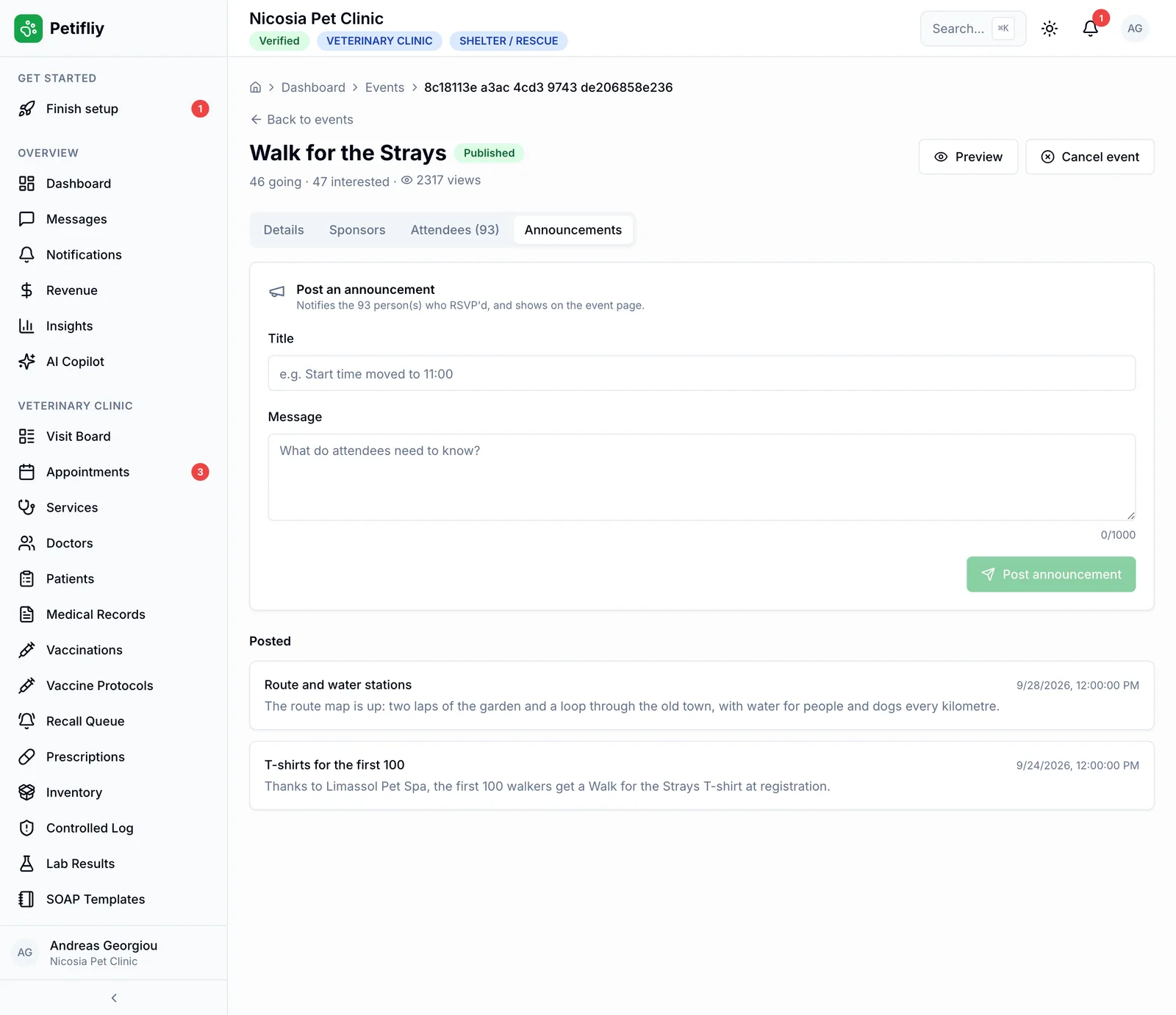
- A notification to everyoneEveryone marked Going or Interested gets it on their phone.
- On the event page tooEvery update stays on the page, newest first, for anyone who opens it later.
- Cancelling, handledIf you cancel, everyone who answered is told, and paid tickets are refunded in full.
- Going, interested, viewsThe counts for every event, in your list and at the top of each event.
Sponsors & partners
Give your partners the credit
Add the businesses and charities behind your event (the rescue it raises money for, the salon that printed the T-shirts, the shop at the water stations) and they appear on the event page with their logo, their role and their links.
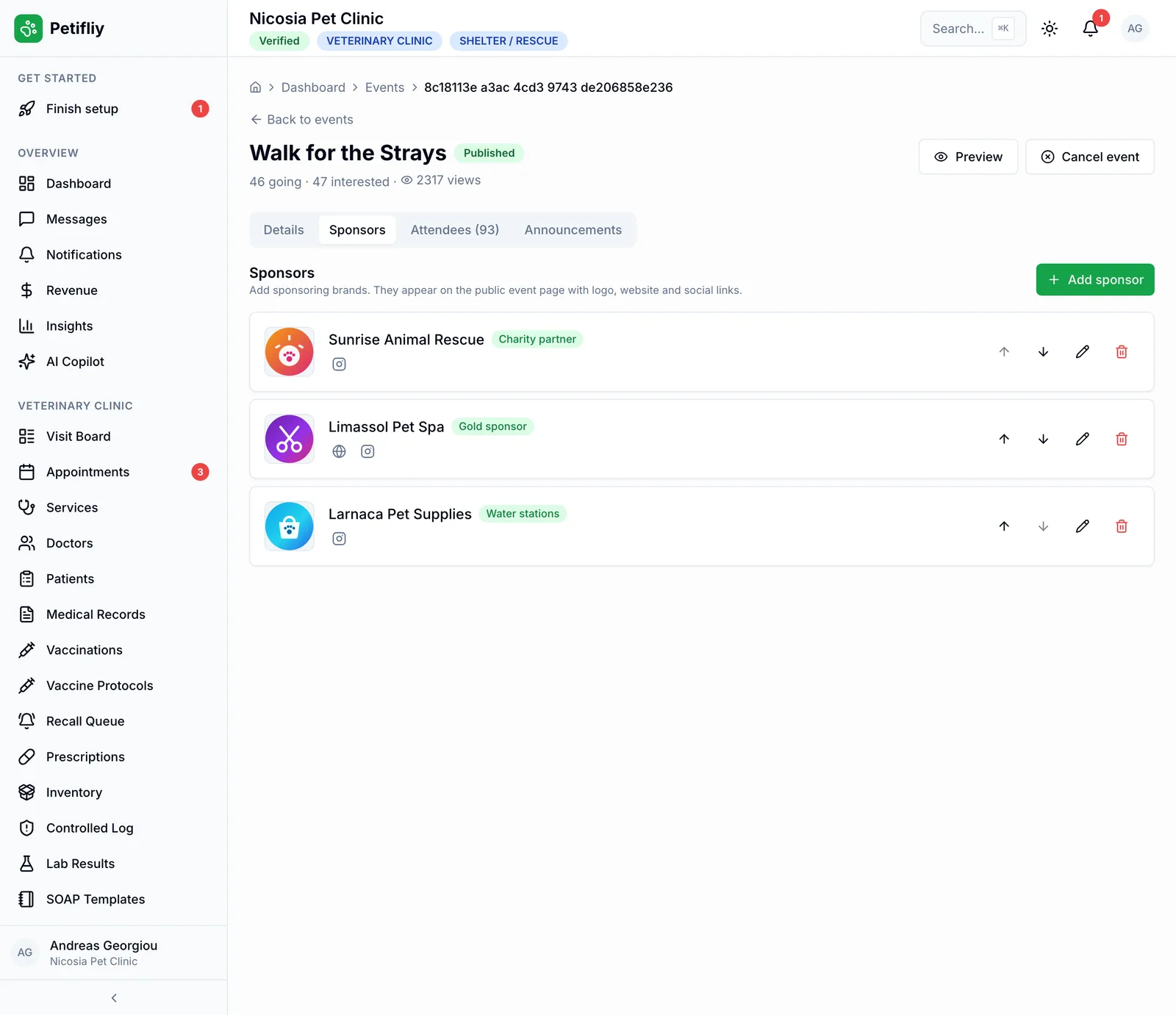
- Logo and nameEach sponsor shows on the event page with its logo.
- Website and socialsLink their website, Instagram, Facebook, TikTok, YouTube, LinkedIn or X.
- Your own labelsGold sponsor, charity partner, water stations: name each role, and put them in the order you like.
- A reason to team upOne event page credits everyone involved: a reason for local businesses to back it.
On the door
Know who’s coming, and check them in
See everyone going and interested, with their guests and their notes. On the day, scan each ticket’s QR code with a barcode scanner or type its reference, and the dashboard counts people in and flags a ticket that’s already been used.
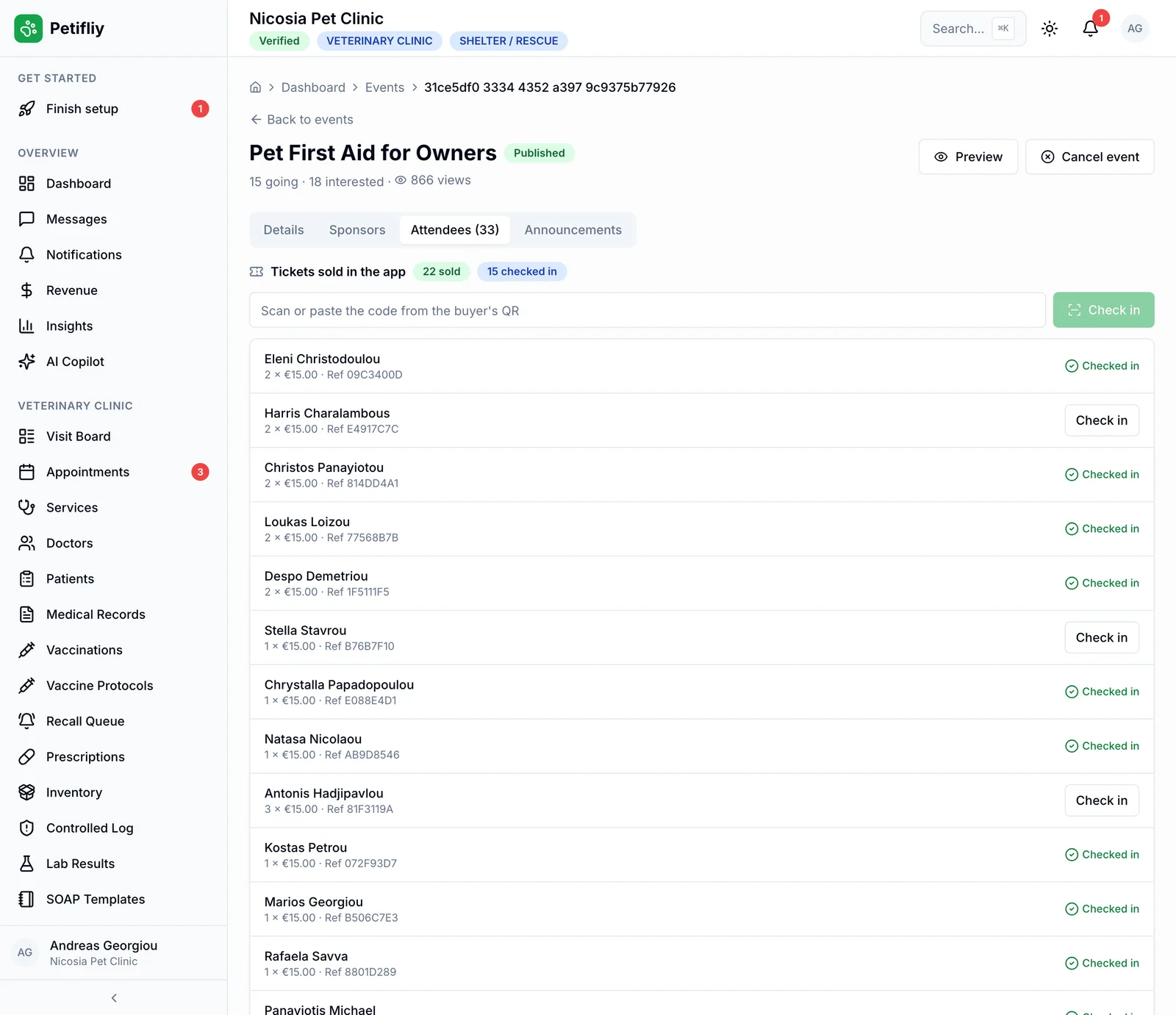
- The attendee listGoing and interested, with names, party size and the note they left.
- Scan or type the codeA USB or Bluetooth barcode scanner types straight into the check-in box, or you can check someone in by hand.
- No ticket used twiceA code that’s already been checked in, or a refunded ticket, is flagged at the door.
- Sold and checked inTickets sold and people checked in, counted as you go.
On the day
From idea to the door
One event, four things that happen to it, and one dashboard for all of them.
- 1
You post it
Write the page, set the place and the price, preview it and publish. It’s in the app straight away.
- 2
It travels
Owners find it in Events, near them and on the map, and send it on to friends and group chats.
- 3
People answer
Interested, registered or ticketed, every answer lands in your attendee list, and the counts go up on the page.
- 4
You welcome them
Post an update if anything changes, then check tickets in at the door.
Then post the next one. Everyone who came is already on Petifly.
Get started
Your first event, live today
No approval queue and nothing to install: an event is in the app the moment you publish it.
A free event needs no payment set-up at all: create the account, write the page and publish. Shelters and rescues: ask us and we’ll switch events on for you.
Other kinds of business on Petifly- 1Create your business accountChoose Event organizer when you sign up. Already on Petifly as a clinic, salon, shop or rescue? Ask us and we’ll switch events on.
- 2Set up payouts (only for paid tickets)Connect your payout account so ticket money is paid to you. Free events don’t need it.
- 3Create the eventPhoto, design, description, place, price and capacity. It stays a draft until you’re happy.
- 4Preview and publishCheck the public page, then publish. It’s in the app for owners at once.
- 5Keep them posted, and welcome them inPost updates as the day gets closer, add your sponsors, and check tickets in at the door.
Put your next event in front of the pet community
Adoption day or dog show, workshop or charity walk: post it once, and let the owners around you find it, share it and come.
- Free and ticketed events
- Paid in the app, to your account
- QR check-in at the door
- In English, Greek and Russian